Choose a pre-order app by the requirements your store cannot do without, rather than its App Store ranking. There are three things to check: when customers pay, how you accept orders and control who can buy, and whom you notify and how.
For split payments, look at Timesact, STOQ or Essent. STOQ's help pages describe automatic charging when you fulfill an order. If you want to take a pre-order with nothing paid at checkout and charge the full amount on a set due date, SellRules also supports this on Pro. For SMS, look at Timesact or STOQ; STOQ also lists a Shopify POS integration. SellRules is a candidate if you want full payment at checkout or deposit and balance payments (including no deposit), along with launch-date changes and purchase rules such as “members only” or “2 per customer” in one app. All four offer a free plan for trying a few pre-orders a month. If you only need to collect the full payment at checkout and keep accepting orders while out of stock, Shopify's “Continue selling when out of stock” setting may be enough without an app.
This article compares Timesact, STOQ, Essent Preorder Back in Stock (Essent below) and JizaiDev's SellRules, available in the Shopify App Store pre-order category, using the same criteria and their listings as of October 19, 2026. This blog is run by the developer of SellRules. JizaiDev has not used the other three apps, so their entries rely only on what their listings say. An unlisted feature is not treated as an absent feature.
Write down the pre-order setup your store needs
Before comparing apps, write a line each for when customers should pay, how you want to take orders, and which rules and notifications you need. This tells you which columns in the comparison tables matter to your store.

Payment timing falls into three broad options.
- Full payment at checkout: You receive the payment when the order is placed, as with a regular purchase. Your store receives the money straight away, but customers may hesitate to pay in advance if shipping is a long way off
- Part up front (a deposit): You collect part of the payment at checkout and the rest later. This reduces the initial amount customers need to pay for expensive products or items that take months to arrive
- Pay later (nothing at checkout): Customers pay nothing when ordering and are charged on a set due date or when the order ships. This asks the least of them up front. According to Shopify's help page, this uses a saved customer payment method to collect the outstanding amount later
How you take orders depends on whether you are accepting pre-orders for a new product with a release date, keeping orders open for a sold-out product, or making products after customers order. Rules and notifications cover purchase conditions such as “2 per customer” or “members first”, collecting email addresses before launch, and notifying customers of shipping delays.
For example: “I want to open pre-orders in November for a new bag that launches in December. Full payment at checkout is fine. When it sells out, I want to switch to back-in-stock signups. To discourage reselling, I want a limit of 2 per customer.” That gives you the conditions you need to compare.
You may not need an app. Shopify's inventory setting “Continue selling when out of stock” lets you accept orders even when stock is at zero. However, as Shopify's help page explains, taking pre-orders with a deposit or deferred payment requires a pre-order app from the App Store. For the choice between manual work, an app and custom development, see choosing how to reduce manual sales preparation. For planning the whole sales setup, see the guide to advance and limited sales.
SellRules does not suit charge-at-fulfillment or split payments
Payment timing does the most to narrow your choices. Based on what we checked on October 19, 2026, SellRules is not a candidate if you need charging at fulfillment or split payments. The other three apps list Deferred payments and Split payments among their features. However, only STOQ's help pages confirmed automatic charging at fulfillment. All four can take pre-orders with nothing charged at checkout.
| App | Full payment at checkout | Deposit (part up front) | Nothing at checkout (pay later) | Automatic charge at fulfillment | Split payments |
|---|---|---|---|---|---|
| Timesact | ○ | ○ (CORE Flex and above) | ○ (0 down preorder, CORE Flex and above) | Listed under pricing (PRO Flex). Help says fulfillment does not trigger a charge; collect manually | ○ (CORE Flex and above) |
| STOQ | ○ | ○ | ○ (No upfront payment) | ○ (automatic on paid plans, on a due date or at fulfillment) | ○ |
| Essent | ○ | ○ | ○ (deferred payment) | Not confirmed (payment on a due date) | ○ |
| SellRules | ○ | ○ (deposit and balance, Pro only; balance collected automatically on its due date) | ○ (no deposit, Pro only; full amount charged automatically on the due date) | — | — |
Sources: each app's App Store listing and help pages (Timesact, STOQ, Essent). Checked October 19, 2026. SellRules was checked against its listing and production code on October 25, 2026 (everything except no deposit also agrees with the guide).
SellRules schedules offer two choices under “Payment collection”: “Full payment at checkout” and “Deposit now, balance later (partial payment)”. Deposit and balance payments require Pro. The balance is collected on your chosen due date from the payment method saved at checkout. With deposit and balance payments, the deposit type can be “Percentage of product price”, “Fixed amount” or “No deposit (charge the full amount on the due date)”. With no deposit, the customer pays nothing at purchase and the full amount is charged automatically on the due date to the saved payment method. Set that date as a number of days after the order (1–365 days) or a specific date. The product page shows “Nothing to pay today · The full amount is due (date)” on one line. If collection fails on the due date, it is not retried automatically: the payment goes straight to “Collection failed”, and the buyer receives an email with a payment link. See deposit and balance payments for setting the deposit and things to check.
For deposits or deferred payment, also check the restrictions of Shopify's pre-order system (purchase options). Shopify's “Pre-orders” help page says that pre-orders are available only to stores using Shopify Payments or PayPal Express. “Setting up pre-orders” also states that customers cannot buy pre-order products with accelerated checkouts such as Shop Pay, Apple Pay and Google Pay, or local payment methods such as Klarna. SellRules uses this system for deposit and balance payments, including no deposit. Check each other app's help pages to find out which of its payment options use the same system.
The same help page says that, without a clearly stated date, you need reasonable grounds to expect delivery within 30 days of purchase. If you cannot deliver within the promised period, you should give a new delivery date and explain that customers can request cancellation or a refund. Whichever app you choose, you still need to state the expected shipping date clearly on the product page.
SellRules pre-orders with “Full payment at checkout” are recorded as regular Shopify orders, with payment and shipping following your Shopify settings. Pre-order and regular products can be bought in the same order, so stores offering cash on delivery can choose to hide it only when the cart contains a pre-order or made-to-order product (cash on delivery settings).
Compare purchase rules and customer notifications
Once payment requirements have narrowed the list, compare how each app accepts orders and notifies customers. All the app listings include quantity limits. In the listings checked on October 19, 2026, we did not find purchase eligibility based on login or customer tags for the other three apps. Those apps, however, list more options for SMS, POS and email marketing integrations.
| App | Setting up order acceptance | Purchase conditions (as listed) | Signups and notifications | Main listed integrations |
|---|---|---|---|---|
| Timesact | Assign products using tags or CSV; turn pre-orders on and off by stock level; coming soon | Pre-order quantity limits (Order limits) | Notification signups, back-in-stock and pre-order emails, SMS (usage-based billing) | Shopify Flow, Klaviyo, GemPages, PageFly and others |
| STOQ | Pre-order / Notify me buttons for sold-out and upcoming products; Markets and multiple locations | Quantity limits (Order limits) | Notification signups, back-in-stock emails and SMS | Shopify Flow, Shopify POS, Klaviyo, Mailchimp, Omnisend |
| Essent | By campaign and variant; sold out, coming soon and made to order; Markets and B2B | Quantity limits (Order limits), prevent mixed carts | Notify me form, back-in-stock emails | Shopify Flow, Omnisend, GemPages, PageFly |
| SellRules | Per-product dates for announcement → pre-order or made to order → regular sale → end; automatic switch to pre-order, made to order or back-in-stock signups at zero stock | Limits per order and per customer, purchase count limits, login required, tag required, block sales | Announcement and notification signup forms; emails for pre-order confirmation, pre-order opening, restocking, delays, shipment, cancellation, balance payments and more (9 languages) | Shopify Flow, Klaviyo (Pro) |
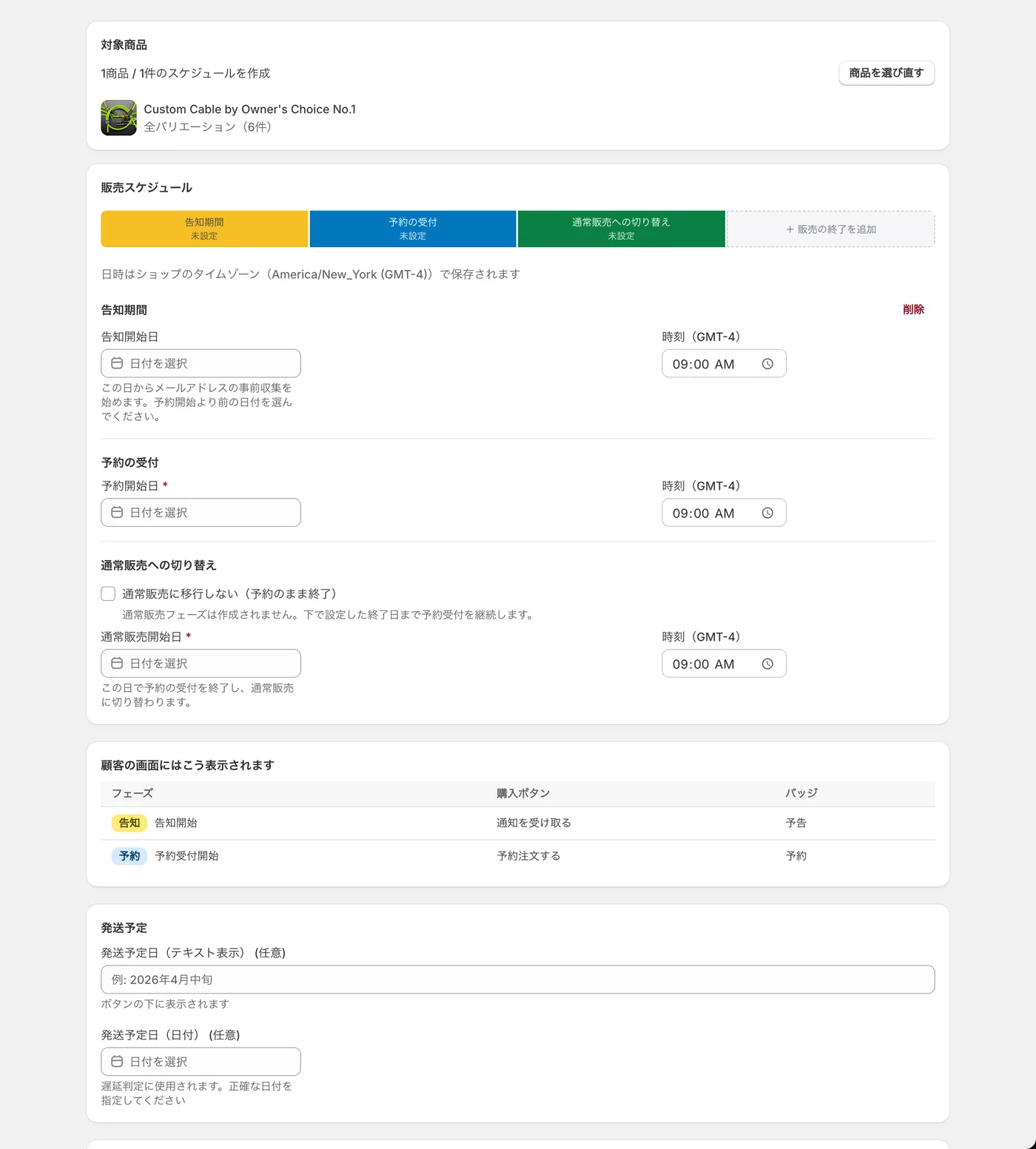
SellRules moves a product through sales stages on set dates and times. During the announcement stage, the product page shows an email signup form. When pre-orders open, it switches to “Pre-order Now”; when regular sales start, it returns to “Add to cart”. With “Tag required”, only members with the specified Shopify customer tag can buy. You can set up “pre-orders from November 1, members only, 2 per customer” on the same screen, including both dates and purchase limits. When sales open to everyone after the members' period, manually change purchase eligibility back to “No restriction” that day. The cumulative customer limit and purchase count limit only apply to customers who were logged in when they bought; guest purchases are not counted. Choose “Login required” to enforce these limits reliably. See members-only sales using customer tags for the setup.
SellRules lists Shopify Flow under integrations and Klaviyo integration among its Pro features. When connected, it sends events such as back-in-stock signups and pre-orders to Klaviyo, where you can use flows to send email or SMS. Sending SMS directly from SellRules is unavailable as of October 25, 2026. POS, Mailchimp and Omnisend are not listed for SellRules either. If SMS is your main way to contact pre-order customers, you need Shopify POS, or you want to connect your existing email marketing service, start with the apps that list the integration you need.
Compare prices using your monthly pre-order volume
Calculate the cost for your monthly number of pre-orders to see the difference in pricing. All four apps bill in US dollars through Shopify. The other three mainly offer monthly allowances with usage charges above the limit, plus higher-priced unlimited plans. SellRules Standard and Pro charge a monthly fee without a pre-order count limit.
| App | Free plan | Paid plans (monthly, USD) | Above the allowance | Free trial |
|---|---|---|---|---|
| Timesact | Up to 20 orders per month for new users (Timesact branding shown) | CORE Flex from 5 (adds 10 monthly orders to the free allowance), PRO Flex from 7, unlimited CORE Fixed from 23 (Basic) to 117 (Plus) | 0.2 per order (CORE Flex) / 0.3 (PRO Flex) | Not stated in listing |
| STOQ | Up to 10 pre-orders and 30 emails per month | Lite 10 (100 monthly), Pro 29 (400 monthly), Unlimited 69 | 0.25 per order (Lite) / 0.1 (Pro) | 14 days on paid plans |
| Essent | Up to 25 pre-orders and 300 back-in-stock notifications per month | Lite 4.95 (100 monthly), Starter 8.95 (300 monthly), Essentials 24.95 (500 monthly), unlimited Professional 59 | 0.25 per order (Lite) / 0.20 (Starter) / 0.10 (Essentials) | 14 days on paid plans |
| SellRules | Up to 10 pre-order and made-to-order orders in total from installation | Standard US$9.90, Pro US$19.90 (deposit and balance payments, Klaviyo integration and more) | No pre-order count limit on Standard or Pro. Usage charges only for notification emails above the monthly allowance, within the approved budget | None (Free serves as the trial) |
For example, here is the cost for a store taking 80 pre-orders a month (a hypothetical calculation in US dollars per month).
- Timesact: CORE Flex (using the listed minimum of 5) covers 20 free orders + 10 = 30. Add 50 excess orders × 0.2 = 10, giving 5 + 10 = 15
- STOQ: Lite (up to 100 a month) costs 10
- Essent: Lite (up to 100 a month) costs 4.95
- SellRules: Free stops at a total of 10 orders, so continued use needs Standard at US$9.90. For deposit and balance payments or no deposit, use Pro at US$19.90
At this volume, Essent Lite costs the least. SellRules Standard costs about the same as STOQ Lite, while Pro is the most expensive of the four. The order changes as volume rises. At 300 a month, for example, STOQ uses Pro (29), Essent uses Starter (8.95), and SellRules stays on Standard regardless of order count. For a few trial pre-orders each month, all four free plans are enough. SellRules Free, however, has a cumulative allowance that does not reset each month, so continued use needs a paid plan.
The difference in track records also deserves a clear account. On October 19, 2026, the listings showed Timesact at 5.0 (2,108 reviews, launched June 2020), STOQ at 5.0 (3,836 reviews, launched November 2021) and Essent at 5.0 (1,318 reviews, launched November 2024). SellRules launched on September 4, 2026 and has 0 reviews. Review counts help you judge an app's history in use, but consider that separately from how well it fits your store.
Test your two shortlisted apps with the same product
Once you have about two candidates, stop comparing descriptions and test the same product under the same conditions. All four have free plans, so you can check the order flow and display at no cost. SellRules deposit and balance payments, including no deposit, require Pro. Before testing the other apps, also check their pricing sections to see which plan includes the payment option you need.
- Pick one test product: Use an upcoming product that is not yet on sale, or a test product hidden from customers
- Use the same settings: Match the pre-order start date and time, shipping-date text and pre-order limit in both apps. Otherwise, you cannot tell whether a difference comes from the display or the features
- Check the customer view: Open the product page to inspect the button, wording and expected shipping date. For notifications, use your own email address to test signup through to receipt
- Check payments and theme compatibility: Place one test order to confirm that your payment methods work for the pre-order product and that the theme's app embed or page builder does not break the display
For SellRules, follow the trial checklist to test one product and the pre-order setup guide to create your first pre-order. If you are moving from another pre-order app, use the app migration checklist to keep open orders from being missed.
When SellRules is not a fit, and what this comparison covers
SellRules does not suit stores where charging at fulfillment or split payments are required, SMS must work without Klaviyo, Shopify POS integration is needed, or a large review history is a priority. If any of those applies, consider an app that lists the relevant feature in the tables above.
This comparison reflects the Shopify App Store listings we checked on October 19, 2026. Features missing from a listing have not been treated as unsupported. Confirm any requirement you cannot do without in the app's help pages or with its support team before installing. Prices and plans can change, so revisit the listing before subscribing. JizaiDev, the developer of SellRules, checked its specifications against the official guide and production app code (checked October 25, 2026). The code confirmed, for example, that deposit and balance payments create Shopify purchase options (selling plans), and that SMS sending directly from SellRules is currently disabled.
Whatever app you use, your store remains responsible for the shipping dates it promises. An app changes order acceptance and display; it does not guarantee stock arrivals or shipping itself. Set realistic shipping dates and have a process for notifying customers promptly when they change.
Frequently asked questions
Which pre-order app can charge customers when an order ships?
Among the apps checked on October 19, 2026, STOQ's help pages describe automatically collecting the balance when an order is fulfilled (paid plans). Timesact lists “Charge on fulfillment for preorders” in its pricing, but its help says fulfillment does not trigger a charge and instructs you to collect payment manually if you want it at shipping. Essent uses a due date; we could not confirm a link to fulfillment. SellRules has two payment collection options: “Full payment at checkout” and “Deposit now, balance later (partial payment)”. Setting the deposit to “No deposit” lets customers pay nothing at checkout, but they are charged on the set due date, with no charge-at-fulfillment option. Pre-orders using Shopify's pre-order system cannot be bought with Shop Pay, Apple Pay, Google Pay or local payment methods.
Can customers buy pre-order and regular products in the same cart?
It depends on the app and settings. Timesact, STOQ and Essent all list Mixed cart among their features, and Essent also lists Prevent mixed carts. SellRules records pre-orders as regular Shopify orders and handles orders that include other products. You can choose to hide cash on delivery only when the cart contains a pre-order or made-to-order product. Place one order during testing to check how combined purchases are handled.
What can I try for free?
In the listings checked on October 19, 2026, Timesact's free plan for new users allows 20 orders a month, STOQ allows 10 pre-orders and 30 emails a month, and Essent allows 25 pre-orders and 300 back-in-stock notifications a month. STOQ and Essent offer a 14-day free trial on paid plans. SellRules Free uses a cumulative allowance from installation, rather than a monthly allowance, and Standard and Pro have no free trial.
What should I check before switching pre-order apps?
Shopify's help says that uninstalling a pre-order app deletes its pre-order data after 48 hours, except for customers' payment information. First record your open orders, promised shipping dates and balance due dates. Finish handling open orders in the current app, and use the new app only for newly accepted orders.
Try SellRules on one product to set launch dates and purchase rules
Write down your requirements in this order: payment timing, order acceptance and purchase rules, then notifications and price. Compare apps on those same conditions. The other three apps are candidates for split payments, STOQ for automatic charging at fulfillment, and the apps listing SMS or POS for those features. SellRules is a candidate for full payment at checkout or deposit and balance payments (including no deposit) alongside launch-date changes and purchase eligibility.
SellRules plans and pricing
| Monthly price | LaunchEvery feature included |
|---|---|
| Monthly price | US$7.99 per month |
| Free trial | 10 days |
| Pre-order and made-to-order orders | Unlimited |
| Back-in-stock and sale-start emails (Notify Me) | Unlimited |
| Purchase limits | No limit on products |
| Customizable notification emails | Yes |
| Deposit payments | Yes |
Pre-orders, made-to-order, back-in-stock alerts, purchase limits, stockout switching, deposit payments and order processing are all included in the Launch plan.
The first 10 days are free. If you remove the app during the trial, you are not charged.
Back-in-stock and sale-start emails have no sending cap. The same goes for required messages such as order confirmations, shipping updates and balance reminders.
The Free, Standard, and Pro plans are closed to new sign-ups. Shops already on them keep their current terms.
Use SellRules Free to check how pre-orders and made-to-order sales are accepted and displayed for one product. Switch to Pro when you decide to use deposit and balance payments (including no deposit) or the Klaviyo integration.
Related articles: Starting pre-orders · What to check in a trial · Choosing an app, manual work or custom development · Planning advance and limited sales · When to collect pre-order payments