You've started taking pre-orders, and your reasonably priced items get orders while your pieces costing tens of thousands of yen, or your made-to-order items, barely move. People are viewing the product page, but they don't get as far as ordering. When that happens, what's stopping customers may not be the product itself but having to pay the full price before anything arrives.
Paying in full for a pre-order weighs more on customers the higher the price and the longer the wait. They're handing over a large amount, and their money is tied up for longer. In a survey of people who have bought on pre-order, 68.9% said they felt uneasy about "being charged the full amount at checkout", and among reasons for cancelling, "I was bothered that the full amount was charged at checkout" came second, at 32.5%. That said, the survey was run by a company that sells pre-order services, and we explain below what to keep in mind when reading it.
Besides full prepayment, you can take only a deposit up front, or charge when you ship. This article looks, in turn, at why full prepayment makes customers hesitate, how to check whether it's happening in your store, how taking a deposit works, and what a deposit doesn't change. We can't promise that a deposit will bring in more pre-orders. Use this as material for deciding whether it suits your products.
About seven in ten pre-order buyers feel uneasy about paying in full before delivery
Plenty of customers are uneasy about paying in full up front for a pre-order. In a survey of 663 people who have bought on pre-order, 68.9% said so.
The figures come from a survey on the pre-order shopping experience and consumer attitudes in Japanese e-commerce, published by Recustomer Inc. on July 10, 2026 (Recustomer Inc. press release on PR TIMES, in Japanese, checked October 18, 2026). On June 28, 2026, it asked 663 men and women in their 20s to 60s across Japan who had bought pre-order products from online stores, through an online questionnaire.
| What was asked | Result |
|---|---|
| Have you ever felt uncomfortable or uneasy about being charged the full amount at checkout, even though delivery was some time away? | "Very much" 29.7%, "somewhat" 39.2%, 68.9% in total |
| Have you ever cancelled a pre-order before it arrived? | "Many times" 29.7%, "once or twice" 29.3%, 59.0% in total |
| Reasons for cancelling (top 4) | The wait was too long 45.3% / I was bothered that the full amount was charged at checkout 32.5% / The release or delivery was postponed 28.9% / I didn't know when it would arrive 27.9% |
| What matters to wait without worry (top answers) | Knowing the specific expected delivery date 56.0% / Being told in advance if the expected date changes 48.0% / Being able to check delivery and production progress 39.1% |
When reading this survey, keep three things in mind.
- The survey was run by a company that sells pre-order services. Recustomer offers a system that charges at shipping instead of at checkout, as well as expected delivery date notifications. The survey's conclusions are framed to recommend that kind of system, so it's safer to read the results as one clue rather than as fact about the whole market.
- It doesn't say who the cancellation percentages are a share of. The published release doesn't state who answered the question on reasons, or whether more than one answer was allowed. The figures add up to more than 100%, so it was probably a question where several reasons could be chosen. You can't read it as "three in ten cancellations are caused by paying in full".
- It didn't ask about product prices. The survey has no finding that "the more expensive the item, the greater the unease". We look at how price comes in, as reasoning, in the next section.
Even so, unease about paying in full came second only to the wait among reasons for cancelling, and nearly seven in ten said they had felt it. For a store taking pre-orders, these are numbers worth checking against your own products.
Why hesitation grows with price and with the wait for delivery
How heavy full prepayment feels grows with "the amount paid before delivery" multiplied by "how long the customer waits for it". The survey didn't ask about price, so what follows is reasoning from the customer's point of view.
For example, compare these three pre-orders (prices and lead times are made-up numbers for illustration).
| Example item | Paid before delivery | Wait | How the customer feels |
|---|---|---|---|
| A ¥3,000 homeware pre-order | ¥3,000 | About 2 weeks | Easy to pay. Little harm done even if it never came |
| A ¥36,000 made-to-order leather bag | ¥36,000 | About 6 weeks | Enough to hold back on other purchases a little. Worries about production running late |
| A ¥120,000 furniture pre-order | ¥120,000 | About 4 months | A large sum tied up for 4 months. Thinks "what if I change my mind, what if it's delayed" |
All three are "pre-order, paid in full", yet with the furniture there's far more to think about before ordering. Worries like these:
- The money is tied up for a long time. With a card, the charge comes before the item arrives and uses up part of the credit limit. They pay this month for furniture that's 4 months away.
- Delays or cancellation start to worry them. In the survey, too, "the release or delivery was postponed" was a reason for cancelling, at 28.9%. The longer the wait, the more likely customers feel the schedule may change.
- Backing out is a bigger hassle. If they cancel after paying in full, they have to wait for a refund. The larger the amount, the more that process weighs on them.
- At a store they haven't bought from before, they're even more careful. An amount that wouldn't bother them at a store they use often takes nerve to pay up front to a store they're trying for the first time.
Worries like these stop customers for reasons that have nothing to do with how appealing the product is, so they tend to show up as "the more expensive the item, the fewer the pre-orders".
Check whether it's happening in your store
Order numbers alone won't tell you whether full prepayment is the cause. Similar symptoms can have several causes, so start with what you can check yourself.
Where to look first
- Look at abandoned checkouts for pre-order items. "Abandoned checkouts" under Orders in the Shopify admin records checkouts that were left for 10 minutes or more after the customer entered their email address (Shopify Help Center: Recovering abandoned checkouts; records are deleted after 3 months). You can't filter the list by product, so open the last few weeks and count how many checkouts contain pre-order items. The clue is whether pre-order items stalling just before payment stand out compared with your regular items.
- Look back over customer questions. Check whether payment questions such as "When will I be charged?", "Can I cancel before it arrives?" or "Can I pay in instalments?" cluster around pre-order items.
- Compare how pre-orders come in for expensive and cheaper items. If, among items on pre-order at the same time, only the expensive ones or those with long waits get few orders, the payment burden may be playing a part.
In a store that gets only a few pre-orders a month, differences in the numbers can be within the range of chance. Don't jump to conclusions from the numbers alone; look at them alongside what customers are asking.
Similar symptoms, and what to fix first
| What you see | Possible cause | What to fix first |
|---|---|---|
| Only expensive items, or items with long waits, stall just before payment | The burden of paying in full before delivery | Consider a deposit, or shortening the pre-order period |
| Lots of "When will it arrive?" questions | The expected ship date is unclear | Put the expected ship date where it's easy to see on the product page |
| Pre-orders come in, but many cancel before shipping | Long waits, frequent schedule changes | Open pre-orders closer to the release date. Decide how you'll notify customers when the schedule changes |
| Hardly anyone views the product page | Before payment even comes up, people aren't reaching the page | Rethink announcements and traffic (changing payment won't fix it) |
Addressing the burden of full prepayment only makes sense when the first row of the table fits. If the other rows are the main issue, fixing what the product page tells customers or when you open pre-orders will help more than changing how you take payment.
Besides full prepayment, you can take just a deposit up front
For items where full prepayment makes customers hesitate, you can take only a deposit up front and charge the rest on a due date: a "deposit payment". Full prepayment isn't wrong; different products suit different approaches.
Full prepayment is the least effort for pre-orders on Shopify. For items costing a few thousand yen, or pre-orders that arrive in about two weeks, it's all you need.
A deposit lightens what customers pay when they order while still collecting a substantial share of the price before delivery. For example, if you take a fifth of the price as a deposit on ¥120,000 furniture, the customer pays ¥24,000 when ordering, and the remaining ¥96,000 is charged on the due date you set. For made-to-order work where materials or stock have to be paid for first, you can collect that money as a deposit before you start making the item. What happens for the customer and your store, all the way to how an uncollected balance is handled, is covered in taking a deposit on Shopify pre-orders. Note that Shopify's built-in features alone can't split the price into a deposit and a balance; you need a pre-order app (Shopify Help Center: Pre-orders).
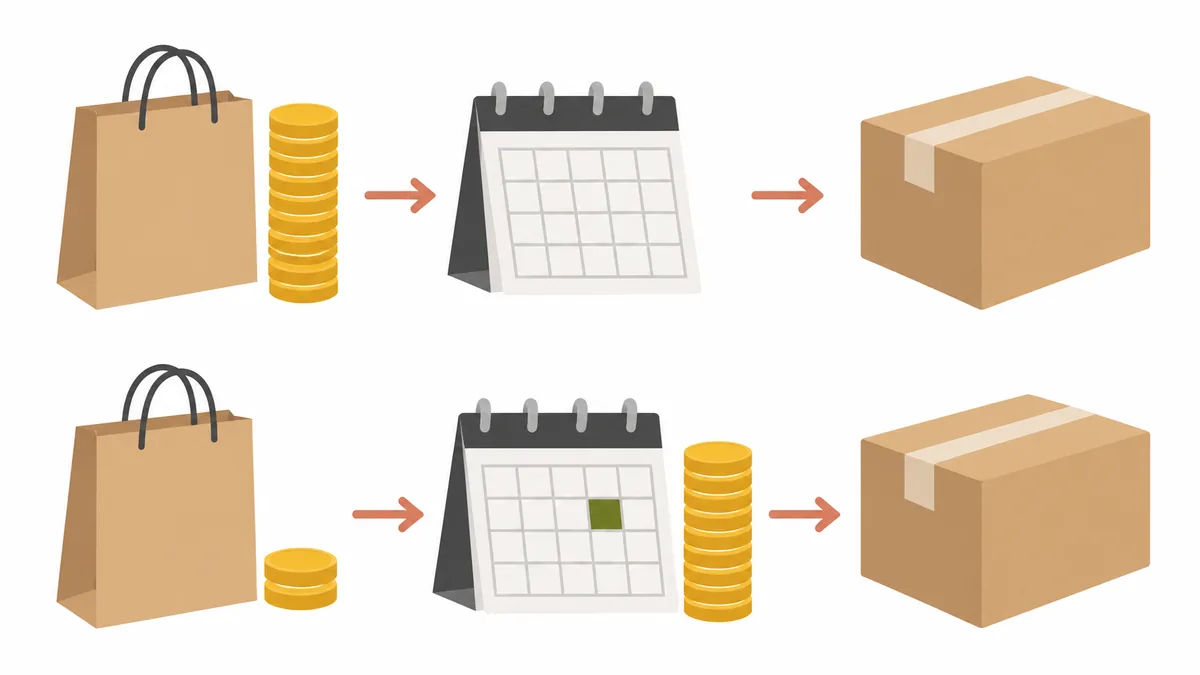
There's also the option of charging nothing at order and billing when you ship. That's the lightest for customers, but your store isn't paid until it ships. And the approach of only authorizing the card at checkout has a time limit (7 days by default with Shopify Payments; Shopify Help Center: Payment authorization and capture), so on its own it doesn't work for pre-orders months away.
If you're unsure, a rough split by price and lead time works: full prepayment for a few thousand yen and about two weeks, and consider a deposit from tens of thousands of yen or a month or more. The cut-off amount and lead time aren't rules; move them as you watch how your own customers respond.
What a deposit doesn't change
The only thing a deposit changes is how much customers pay when they order. It doesn't prevent cancellations or clear up an unclear delivery date. Before choosing a deposit, know the following.
- If an order is cancelled, you refund the deposit. In SellRules, whether the customer or your store cancels, the deposit received is refunded in full to the original payment method. Customers can cancel on their own through the link in emails such as the balance reminder (except for orders bought together with regular items). Raising the deposit won't cover cancellation losses.
- Worry about the delivery date remains. The most common reason for cancelling in the survey was "the wait was too long", at 45.3%. How you state the expected ship date, and how you notify customers when the schedule changes, need to be sorted out separately from how you take payment.
- The survey's "wouldn't have cancelled" isn't about deposits. The release says 85% of those who had cancelled answered that they think they wouldn't have cancelled, or probably wouldn't have, with "a system that charges at shipping and sends the expected delivery date and any changes". That was a hypothetical question combining charging at shipping with date notifications; it didn't ask about deposits.
- Some payment methods can't be used. Because the balance is charged automatically on the due date, deposit products can only be bought with payment methods that can be saved at purchase. With SellRules, cash on delivery, bank transfer, Shop Pay, Apple Pay, Google Pay and local payment methods such as Klarna can't be used. In stores where many customers pay these ways, switching to a deposit means some customers can no longer buy.
- Customers pay twice. You need to make it clear to customers that the balance will be charged on the due date.
Exactly which payments work, and how to check whether your store's payments work, is covered in which payments work for deposits.
Alongside a deposit, rethink how you communicate the delivery date
Whether or not you take a deposit, the first thing to sort out is making the expected ship date clear on the product page. In the survey, too, the most common answer for what matters to wait without worry was "knowing the specific expected delivery date", at 56.0%.
These are the four things to put on the product page.
- When you'll ship. Rather than "early December", be as specific as you can, such as "expected to ship around December 10". With SellRules pre-orders, an expected ship date such as "Est. shipping: December 10" or "Ships within 30 days of order" can appear near the cart button.
- How you'll let customers know if the schedule changes. Say whether you'll email them or update the product page.
- The cancellation deadline and how refunds work. If you have terms such as not accepting cancellations once production has started, write them on the product page and in the returns and cancellations section of your store policies. Bear in mind, though, that the app doesn't enforce the terms you write.
- When and how much they'll pay. If you take a deposit, state the amount paid now and the date the balance is charged. In SellRules, a line such as "Pay today: 20% deposit · The balance is charged automatically on (due date), using the payment method you used" appears on the product page automatically.
What customers see on the product page, at checkout and in their emails when you take a deposit is shown step by step in deposit payments from the customer's side.
How to try deposits with SellRules
If a deposit looks like a good fit, pick just one expensive item, or one with a long wait, and try it. If you change every product at once, you won't be able to tell what made the difference.
With SellRules deposit and balance payments, you set the deposit as a percentage of the product price (0.01–99.99%) or a fixed amount, and the balance is charged automatically, a set number of days after the order or on a date you choose, to the payment method saved at purchase. Three days before the due date, customers receive a balance reminder email. Until the balance is paid, the order stays on fulfillment hold, and if the charge fails, the order isn't cancelled automatically.
Try it in this order.
- Check that your store's payments work. Supported options include Shopify Payments, PayPal Express, Adyen and Stripe (Stripe only for some stores) (which payments work for deposits).
- Decide the deposit percentage and the balance due date. Base them on the money you pay out first and the time until shipping (how much deposit to take, and when to charge the balance).
- Put one product on a deposit and make a test purchase. The setup steps and what to check are covered in how to charge a deposit and the balance separately.
- Watch how orders come in for a while. Compared with before, check whether fewer people stall just before payment and whether payment questions have dropped.
Deposit and balance payments are a Pro plan feature.
SellRules plans and pricing
| Monthly price | FreeStart with one product | StandardRun it at full scale | ProAdd deposit and balance payments |
|---|---|---|---|
| Monthly price | Free | US$9.90 per month | US$19.90 per month |
| Pre-order and made-to-order orders | Up to 10 in total | Unlimited | Unlimited |
| Back-in-stock and sale-start emails (Notify Me) | Up to 15 in total (not refilled monthly) | 1,000 per month | 5,000 per month |
| Purchase limits | Up to 1 product | No limit on products | No limit on products |
| Customizable notification emails | No | Yes | Yes |
| Deposit and balance payments | No | No | Yes |
| Extra sends (email) | No | Yes (within the budget you approve) | Yes (within the budget you approve) |
Pre-orders, made-to-order, back-in-stock sign-ups, purchase limits, stockout switching and order processing are available from the Free plan.
Standard and Pro have no free trial; the Free plan takes its place.
The Free plan counts are totals since you installed the app. Required messages such as order confirmations, shipping and balance reminders are not counted.
The earlier Launch plan is closed to new sign-ups, but if you are on it your current terms stay as they are.
Standard and Pro have no free trial. A natural order is to try pre-order display and the ordering flow on the Free plan, then switch to Pro once you decide to take deposits.
Frequently asked questions
Will taking a deposit bring in more pre-orders?
Not necessarily. The survey in this article asked how many people felt uneasy about paying in full and why they cancelled; it did not measure how many more pre-orders a deposit brings in. What a deposit changes is how much customers pay when they order. If the real cause is an unclear delivery date or a long wait, a deposit won't bring in more pre-orders. Try it on one product first and compare how orders come in with how they came in before.
Should cheaper items use a deposit too?
In most cases, full prepayment is enough. For items costing a few thousand yen, or pre-orders that arrive in about two weeks, the amount paid before delivery is small, and splitting it into a deposit and a balance adds emails and checks that cost customers more effort than they save. Start considering a deposit for expensive items, or for pre-orders that take a month or more to arrive.
If a customer who paid a deposit cancels, can I keep the deposit?
No, you'll refund it. In SellRules, cancelling an order refunds the deposit received in full. Customers can cancel on their own through the link in emails such as the balance reminder, and the deposit is then refunded automatically. There is no setting in the app to block this. If you want terms such as no cancellations once production has started, write them on the product page and in the returns and cancellations section of your store policies, and if a cancellation doesn't meet those terms, you'll sort it out with the customer individually after the refund has gone through. Cancellation terms touch on consumer law, so if you're unsure how to word them, ask a professional.
Can I reduce hesitation while keeping full prepayment?
Yes, in three ways: state when you'll ship where it's easy to see on the product page, say how you'll let customers know if the schedule changes, and give the cancellation deadline and how refunds work. In the survey, too, the most common answer for what matters to wait without worry was "knowing the specific expected delivery date". You can also shorten the wait by opening pre-orders closer to the release date.
Summary | For expensive pre-order items, start with the weight of payment
When pre-orders for expensive items, or items with long waits, aren't picking up, check whether paying in full before delivery is what's stopping customers. Checkouts that stall just before payment, and questions about payment, are your clues.
If that fits, a deposit is one way to lighten what customers pay when they order. A deposit won't necessarily bring in more pre-orders, though, and how you communicate the delivery date needs sorting out separately. Start with one product and compare with before. The bigger picture of how to set up pre-orders and ordering is covered in how to run early-access and limited sales on Shopify.
Features checked on October 18, 2026 (by JizaiDev, the developer of SellRules, against the app's code and the wording shown on product pages). The deposit range, balance charging, reminder email timing, refunds on cancellation and supported payments are based on SellRules as of that date. Survey figures are quoted from the release above. Product prices and lead times are made-up numbers for illustration, not figures from a real store. Check the latest pricing on the Shopify App Store listing.