Once you've decided to take pre-orders with a deposit and balance, two questions tend to stop store owners in their tracks: what share of the price should the deposit be, and when should the balance be charged? Rules of thumb like "thirty percent" or "half" are easy to come across, but they don't tell you whether that fits your own product.
There is no deposit percentage that suits every store. What you work from are four numbers of your own: your product price, the money you pay out before shipping, the time until shipping, and what you refund if an order is cancelled. The floor for the deposit is "money paid out first ÷ product price", and the ceiling is an amount customers will commit to without much thought. The balance due date goes at your planned ship date minus the days a customer needs to fix their payment method if the charge fails.
This article walks through how to decide, with a decision table and three worked examples. Deposit and balance payments in SellRules need the Pro plan (US$19.90 per month). Setup steps, supported payments and the emails customers receive are covered in how to take a deposit now and charge the balance later. Here we only deal with what to enter there: the deposit value and the balance due date.
Before looking for a "typical" rate, write down four numbers for your store
Before you settle on a deposit, write these four down for each product. With all four in front of you, the percentage and the due date are much easier to narrow down.
| Number to write down | What it's for | Where to find it |
|---|---|---|
| Product price (incl. tax, per variant) | The basis for the percentage, and how much the customer commits when ordering | The product page price. If variants differ, the cheapest and the most expensive |
| Money you pay out before shipping | The floor for the deposit | Materials, down payments to a factory or supplier, outsourcing costs: whatever you pay between taking the order and shipping it |
| Time until shipping | The due date, and whether to use a specific date or days after checkout | For pre-orders, the release or planned ship date; for made-to-order, the days from order to shipping |
| What you refund on cancellation | What a deposit can and can't do for you | In SellRules, everything received is refunded in full (see below) |
Why write these down before hunting for a "typical" rate? Because the same thirty percent means something completely different from one product to the next. For custom furniture where materials run over forty percent of the price, thirty percent doesn't even cover your materials. On the other hand, put a thirty percent deposit on a ¥3,000 gift item that arrives in two weeks, and customers just get extra steps with nothing in return.
The fourth number, what you refund on cancellation, decides what a deposit is actually for. In SellRules, whether the customer cancels from the link in the reminder email or your store cancels from "Order progress", everything received up to that point (the deposit, plus the balance if it has been paid) is refunded in full to the original payment method. In other words, a deposit is not money you keep when an order is cancelled. A deposit does two things: it gets you the money for your upfront costs before you have to spend it, and it confirms at the ordering stage that the customer really means to buy.
Set the deposit with the money you pay out first as the floor
You choose the deposit between a floor and a ceiling. The floor is "money you pay out before shipping ÷ product price". Go below it, and you end up fronting the cost of materials or stock out of your own pocket.
The ceiling is the amount at which a customer thinks "sure, I'll order now". There's no set figure for it, but there are a few pointers.
- The higher the price, the lower the percentage can be while the amount still adds up. On a piece of furniture priced at a hundred and twenty thousand yen, even a fifth of the price is ¥24,000. But the closer the deposit gets to half the price, the less it feels like an easier option than paying in full.
- The longer the wait until shipping, the lighter the commitment should be. Paying half up front for something that arrives in six months feels to the customer like lending you the money for half a year.
- If you pay out almost nothing first, the deposit can be small. For a pre-order where the stock is already bought and you're just waiting for the release date, the deposit only needs to confirm the customer's intent to buy.
For some products the floor ends up above the ceiling. For a made-to-order item whose materials cost more than sixty percent of the price, a sixty percent deposit feels heavy to customers. For products like that, don't insist on a deposit: either take full payment, or put the balance due date before production starts so you have the full price before you buy materials (see the next section).
In SellRules, you set the deposit either as a "Percentage of product price", from 0.01% to 99.99% (up to two decimal places), or as a "Fixed amount" per item. A fixed amount has to be less than the product price.
Percentage or fixed amount?
For products whose variants have different prices, a percentage gives you a deposit worked out the same way for every variant. A fixed amount is easy to explain, as in "¥5,000 to reserve", but the cheaper the variant, the larger the share of its price the deposit becomes.
Take a bag priced at ¥19,800 for size S and ¥29,800 for size L. With a fixed deposit of ¥5,000, that's about 25% of the S price and about 17% of the L price. At 30%, the deposit is ¥5,940 for S and ¥8,940 for L. Which suits your store comes down to how you want to present it on the product page. A fixed amount is set per item, so if a product may be bought in quantities of more than one per order, check the deposit amount with a test purchase.
If you plan to change a product's price, a percentage moves the deposit along with it, so there's nothing to fix. With a fixed amount, after a price cut you'll need to check that the deposit isn't now equal to or above the product price.
Work the balance due date back from your planned ship date
Put the balance due date at your planned ship date minus the days a customer needs to fix their payment method. The reason not to cut it close to the ship date is to leave time in case the charge fails.
In SellRules, the due date plays out like this:
- Three days before the due date, the customer receives the balance reminder email (for orders placed when the due date is less than three days away, it arrives after the order is placed). The email contains a link to pay before the due date and a link to cancel the order.
- On the due date, the balance is charged automatically to the payment method saved at purchase.
- If the charge fails, SellRules does not retry automatically. The customer gets an email with a payment link (or, for orders where a link can't be prepared, an email asking them to contact your store), and your store gets a failure notification email. In "Order progress", open "Balance collection details" and click "Retry collection" to charge the saved payment method again.
- Until the balance is paid, the order stays on a fulfillment hold and can't be shipped. It is never cancelled automatically either.
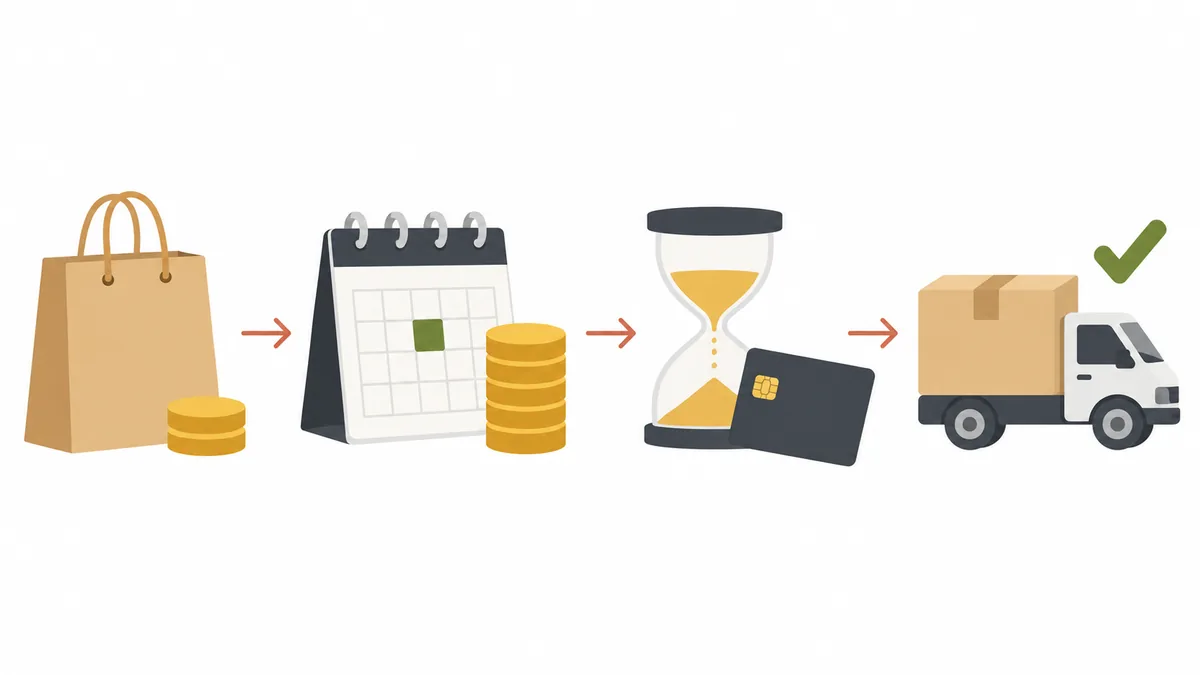
So between the due date and the planned ship date, you need enough days for the customer to notice the failure email and fix their payment method. How many depends on your customers, but allowing for a weekend in between, about a week gives everyone room to deal with it calmly. What to do after a failed charge is covered in what to do when the balance isn't paid.
There is one more decision about where the due date goes: before you start production, or before you ship.
| Where the due date goes | For your store | For the customer | Suits |
|---|---|---|---|
| Before production or purchasing starts | You have the full price before you buy materials, so you don't front the cost. Customers who are wavering can cancel at the reminder email stage, before you buy materials (if they cancel later, you refund everything) | They pay the full price earlier | Made-to-order items with high material costs, personalised or made-to-measure items that can't be remade |
| Before shipping | While you're making it, you're working with the deposit only | They don't pay the balance until just before delivery | Pre-orders waiting on stock already bought, products whose materials the deposit covers |
Even with the due date before production starts, a cancellation is still refunded in full, and if the customer cancels after paying the balance, you refund both the deposit and the balance. Still, because the reminder email arrives three days before the due date, customers who change their mind get a chance to cancel before you buy materials. What the position of the due date can change is this: it moves the time when cancellations tend to happen to before you buy materials, and it means you no longer front the cost.
Specific date or days after checkout?
In SellRules, you choose whether the balance due date is a "Specific date" or "Days after checkout" (1 to 365 days).
A specific date suits pre-orders with a fixed release date. Everyone's balance comes in on the same day, which makes it easier to plan shipping. The date uses your shop's time zone, and you need to pick a future date when you save.
What to watch is how the due date lines up with your pre-order window. An order placed after the due date is treated as already past its balance due date, so the balance is charged after the order is placed, without waiting for a due date. From the customer's side, what they thought was a deposit turns into paying almost the full price. When you use a specific date, set it after the day your pre-orders close.
Days after checkout suits made-to-order items you start making per order. Even when orders come in on different days, each one gets a due date that matches its own production time.
The thing to watch with days after checkout is that the due date doesn't move if production runs late. Say you expect six weeks of work and set 35 days: if a busy spell stretches it to eight weeks, you'll be charging the balance three weeks before the item is finished. If your lead times shift a lot with your workload, allow more days, or revisit the number during busy periods.
A decision table by price and time until shipping
Here is the reasoning so far as a table, by combination of price and time until shipping. The thresholds of ten thousand yen and one month are just starting points for the decision, not a market rate or a rule. Plug in your own four numbers and adjust.
| Product | Use deposit and balance? | How to set the deposit | Balance due date |
|---|---|---|---|
| Under ten thousand yen, arrives within a month | Full payment is fine | — | — |
| Under ten thousand yen, arrives a month or more later | Consider it if you want a firm read on pre-order numbers | A small fixed amount (e.g. ¥1,000) | If the release date is fixed, a specific date about a week before shipping |
| Ten thousand yen or more, little money paid out first (e.g. a pre-order waiting on stock already bought) | Deposit and balance fits | Enough to confirm intent to buy. Keep the percentage small | A specific date, about a week before shipping |
| Ten thousand yen or more, a lot of money paid out first (e.g. made-to-order that needs materials bought in) | Deposit and balance fits | Money paid out first ÷ price as the floor | Days after checkout, before production starts or about a week before it's finished |
| Money paid out first is more than half the price | Full payment, or a due date before production starts | If the floor is too heavy, don't insist on a deposit | Before production starts |
| Many customers pay by cash on delivery or bank transfer | Full payment, or offer both | Deposit products can't be bought with these payments | — |
The last row isn't about the percentage or the due date, but if you don't check it first, the settings you've decided on won't be usable at all. Deposit products can't be bought with cash on delivery or bank transfer, nor with Shop Pay, Apple Pay, Google Pay and others. You can check what works with your store's payments by following which payments work with deposits and which don't.
Three examples, from the numbers to the percentage and due date
Below, three hypothetical products show how you get from the four numbers to a percentage and a due date. All prices and costs are made-up figures for illustration.
Example: a made-to-order dining table
- Price: ¥120,000
- Money paid out first: ¥42,000 for wood and hardware (35% of the price)
- Time until shipping: 8 weeks (56 days) from the order. The wood is bought in the first week
The floor is 42,000 ÷ 120,000 = 35%. A deposit of 35% (¥42,000) means you don't have to front the purchasing cost. For a table at this price, a deposit of a little over forty thousand yen is a much lighter commitment than paying in full.
Use "Days after checkout" for the balance due date. To collect a week before the table is finished, that's 56 − 7 = 49 days. You could instead put the due date before purchasing (say, 5 days after the order), but then the customer pays the full price right after ordering, and there's little point in a deposit. And since a cancellation after the balance is paid is refunded in full, it wouldn't rule out cancellations after you've bought the wood either. In this example the deposit covers the purchasing cost, so we go with 49 days. On top of that, state a cancellation deadline on the product page and in the wording of the reminder email. That deadline is guidance for customers: even after it passes, they can still cancel through the link in the reminder email. Handle cancellations after the deadline individually, based on the terms you've written.
Example: an apparel pre-order with a fixed release date
- Price: ¥12,800 (the same for every size)
- Money paid out first: a down payment to the factory when ordering, about ¥2,500 per garment (about 20%)
- Pre-orders open: November 1 to November 20. Planned shipping: December 15
The floor is about 20%. To keep it easy to explain, set a fixed deposit of ¥3,000 (about 23% of ¥12,800).
Use "Specific date" for the balance due date. Set it to December 8, about a week before shipping, and the reminder email goes out on December 5. That's after pre-orders close (November 20), so the due date won't pass while orders are still coming in.
Example: merchandise on pre-order three weeks before release
- Price: ¥3,300
- Money paid out first: the stock is already bought, nothing more to pay
- Three weeks until release
The floor is 0%, and the only job a deposit would do is confirm intent to buy. Splitting a ¥3,300 item into deposit and balance means the customer gets a reminder email and two charges, which is a lot of steps for no real gain. It falls in the first row of the table, so keep it on full payment.
When to revisit your settings
Even after you've decided on the deposit and due date, revisit them in situations like these:
- When the planned ship date slips. A due date set as a specific date doesn't move on its own. To push back the due date on orders you've already accepted, open the order's "Balance collection details" in "Order progress" in SellRules, enter a date under "New due date" and click "Change due date" (this only works for orders whose balance charge hasn't started yet). You can pick a date later than the current due date and after today. The first time you use it, you'll be asked to approve the permission needed to change due dates. Once changed, the customer receives a due date change email. If you change the balance payment due date on the order in Shopify instead, SellRules picks up that change too and sends the same email. For how to tell customers about the delay itself, managing made-to-order orders may also help.
- When you change the price. A fixed deposit doesn't follow the price. After a price cut, check that the deposit isn't now equal to or above the product price.
- When balance charges keep failing. Widen the gap between the due date and the planned ship date to give customers more time to fix their payment method.
- When you get a lot of cancellations. Raising the deposit won't act as a brake, because a cancellation refunds everything. Look at when the cancellations are happening, and if most come after you've bought materials, move the due date earlier, before production. At the same time, review the cancellation terms on your product page and how you handle cancellations that don't meet them.
Changing the settings doesn't touch orders you've already accepted: they keep the deposit and due date they had at purchase. Changes only apply to orders placed afterwards, so expect the same product to have a mix of orders with different due dates, and update your product page to match.
One more point: a cancellation in SellRules refunds everything you have received (the amount received minus anything already refunded goes back to the original payment method, including the balance if it has been paid). If your policy is not to accept cancellations once production has started, or to charge a fee for them, write those terms on the product page and in the returns and cancellations section of your store policies, and handle each case individually when a customer gets in touch. The app does not enforce those terms for you, and the cancellation link in the balance reminder email still works after production has started and even after the balance has been paid (orders that also include products without a deposit can't be cancelled through this link). Update the wording of the "Balance payment reminder" email under "Settings → Email templates" to match your terms (the steps are in the "Cancellations, turning it off, and before you uninstall the app" section of how to take a deposit now and charge the balance later). How you word cancellation terms has legal implications, so if you're unsure, ask a professional.
Frequently asked questions
What percentage is normal for a deposit?
There is no fixed percentage that works across industries and products. The same thirty percent is too little for a made-to-order item whose materials cost more than thirty percent of the price, and too much for a small gift item that arrives in two weeks. Use the money you pay out before shipping, divided by the price, as the floor, an amount customers will commit to without much thought as the ceiling, and choose between the two.
Will a higher deposit reduce cancellations?
You can't count on the deposit amount alone to reduce cancellations. In SellRules, whether the customer or your store cancels the order, everything received up to that point is refunded in full. If the balance has already been paid, that is refunded too, so the deposit never works as a cancellation fee. Putting the balance due date before production starts means you don't have to front the cost of materials, and customers who are wavering can cancel when the reminder email arrives, which is before you buy materials. It can't stop cancellations after that point, though. Stating a cancellation deadline on the product page and in the reminder email is guidance for customers; the app does not enforce it. A cancellation through the link goes all the way to a refund, so any handling of cancellations that don't meet your terms (such as charging a fee) has to be worked out with each customer individually.
Can I set the balance due date to the same day as the planned ship date?
We don't recommend it. If the balance charge fails, SellRules does not retry automatically; it sends the customer an email with a payment link. The order stays on a fulfillment hold until the balance is paid, so with the due date on the ship date, any failed order ships late. Put the due date at least a few days to about a week before shipping.
If I change the deposit or due date while pre-orders are open, what happens to orders I've already accepted?
Orders you've already accepted keep the deposit and balance due date they had at purchase. A settings change only applies to orders placed after it. The same product will then have orders with different due dates, so check the due dates of accepted orders before you change anything, and update the product page to match.
What happens if an order comes in after a due date set as a specific date?
An order placed after the due date is treated as already past its balance due date, so the balance is charged after the order is placed, without waiting for a due date. From the customer's side, what they thought was a deposit turns into paying almost the full price. When you use a specific date, set it after the day your pre-orders close.
Try your percentage and due date on one product
Once you've settled on a percentage and due date, switch just one product to a deposit and place a test order yourself. Before you can use deposits, turn on "Deposits and balance payments" in SellRules settings. If SellRules is switched on under "App embeds" in your theme, the product page shows the deposit and the balance due date as "Pay today", so you can check they match what you decided.
SellRules plans and pricing
| Monthly price | FreeStart with one product | StandardRun it at full scale | ProAdd deposit and balance payments |
|---|---|---|---|
| Monthly price | Free | US$9.90 per month | US$19.90 per month |
| Pre-order and made-to-order orders | Up to 10 in total | Unlimited | Unlimited |
| Back-in-stock and sale-start emails (Notify Me) | Up to 15 in total (not refilled monthly) | 1,000 per month | 5,000 per month |
| Purchase limits | Up to 1 product | No limit on products | No limit on products |
| Customizable notification emails | No | Yes | Yes |
| Deposit and balance payments | No | No | Yes |
| Extra sends (email) | No | Yes (within the budget you approve) | Yes (within the budget you approve) |
Pre-orders, made-to-order, back-in-stock sign-ups, purchase limits, stockout switching and order processing are available from the Free plan.
Standard and Pro have no free trial; the Free plan takes its place.
The Free plan counts are totals since you installed the app. Required messages such as order confirmations, shipping and balance reminders are not counted.
The earlier Launch plan is closed to new sign-ups, but if you are on it your current terms stay as they are.
Deposit and balance payments are a Pro plan feature, and Standard and Pro have no free trial. A natural order is to try pre-order and made-to-order displays on the Free plan, then switch to Pro once you've decided to take deposits. The setup steps and how to check a test purchase are in how to take a deposit now and charge the balance later, and the bigger picture of planning pre-orders and order-taking is in how to plan advance and limited-edition sales.
Features checked on October 19, 2026 by JizaiDev, the developer of SellRules, against the code of the app as published on that date and the wording on its settings screens, order progress screen and emails. The deposit range, how the balance due date is set, when the reminder email goes out, and what happens when a charge fails or an order is cancelled reflect SellRules as of that date. Prices, costs and lead times are made-up figures for illustration, not numbers from a real store. For current pricing, see the Shopify App Store listing.