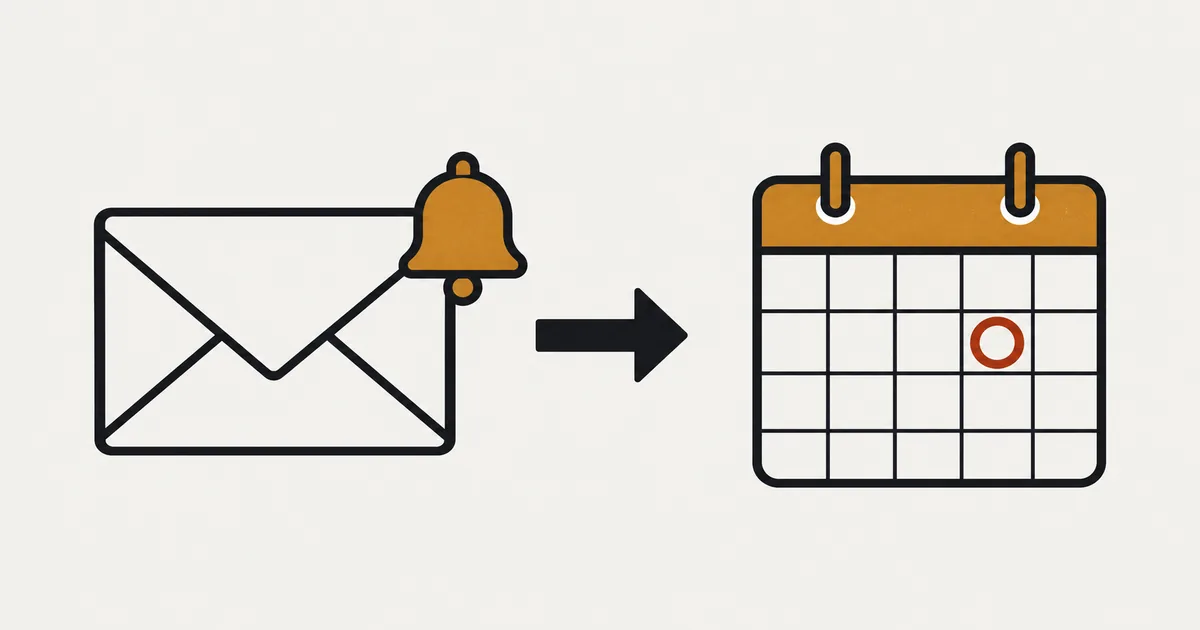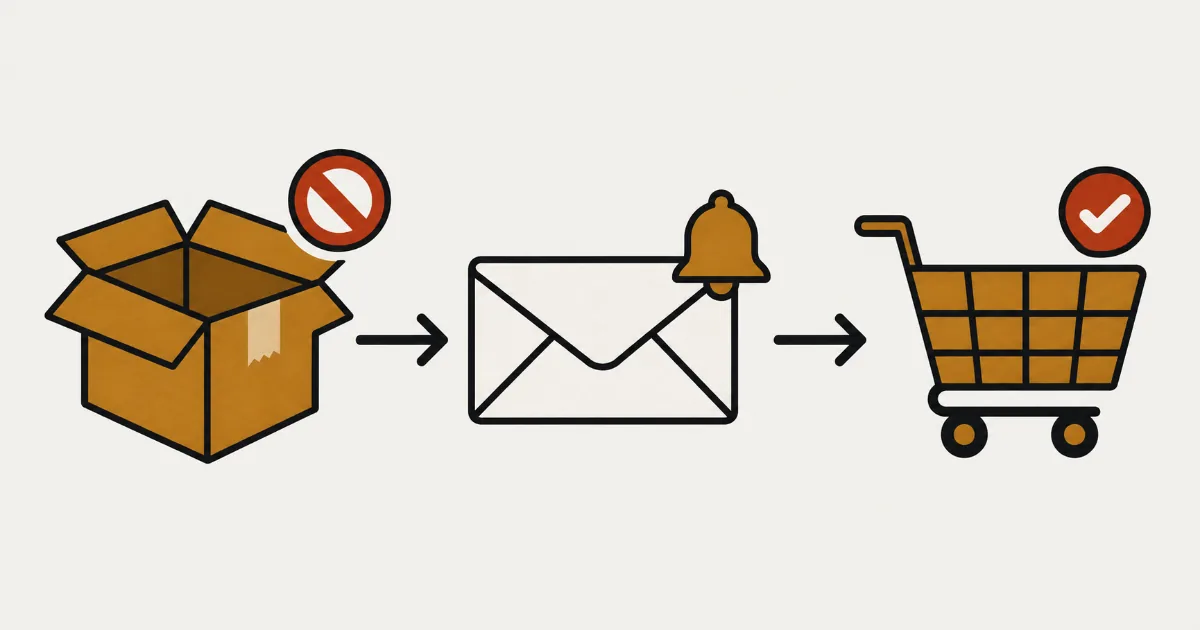
When a popular product sells out, are you keeping a separate note of every “please let me know when it's back” request? Back-in-stock notifications let customers leave their email address on the sold-out product page. When stock returns, you can notify everyone who signed up together.
To set this up in SellRules, turn on the app in your theme's app embeds and create a sold-out switch using “Back-in-stock notification only”. A signup form appears when stock is 0. When the same variant returns to 1 or more, subscribers receive an email with the subject “[Back in Stock] Product name”. All of this is available on the Free plan.
Start with one test product and your own email address to check the whole journey from signup to receipt. Then you can adjust the form and email wording, understand who receives each notification, and check what happens when you change the switch mode or something does not work. If you're still deciding between taking orders and collecting signups, read pre-orders or back-in-stock notifications for sold-out products first. For the wider setup covering pre-orders, back-in-stock notifications and sales periods, see how to set up advance and limited sales.
Back-in-stock signup is a notification, not a stock reservation
A back-in-stock signup asks the shop to send an email when stock returns. It does not place an order, take payment or reserve an item.
Here is what customers see, using the default wording for an English-language store.
- On the sold-out product page, the buy button is replaced by “We'll email you as soon as it's available.”, an email field and the “Get Notified” button.
- After entering their email and signing up, they see “You're signed up! We'll notify you when available.”
- When stock returns, they receive an email with the subject “[Back in Stock] Product name”.
- They click “Buy Now →” in the email to open the product page and buy as usual.
The common misunderstanding is that signing up sets an item aside. For example, if 3 units come back into stock and 20 people have signed up, all 20 receive the email, but the first 3 buyers take the available stock. This is an illustrative example. Adding “This notification does not reserve an item” to the form description can reduce questions from customers who signed up but could not buy. The wording settings are covered later in this guide.
Three checks before you start
Check these three things before setting up the form. They help avoid a missing signup form or a product that does not switch when sold out.
| What to check | Why it matters | Where to check |
|---|---|---|
| SellRules is on in the theme's app embeds | If it is off, neither the signup form nor the button switch appears on the product page | Shopify theme editor → App embeds on the left |
| Inventory is tracked for the product | Products without inventory tracking, gift cards, products that do not require shipping, and fee products created by other apps with an exclusion tag are treated as products without tracked stock. They will not switch even at stock 0 | Inventory section in Shopify's product editor |
| The product has no manually created pre-order or made-to-order sales schedule | A manual schedule for the whole product prevents its sold-out switch from taking effect | Sales schedules in SellRules. A warning also appears on the creation screen |
You can test on the Free plan. The sold-out switch, product-page signup form and “Back-in-stock subscribers” screen are all available from Free.
Test signup and email delivery with one product
Use one test product and your own email address first. If you test on a product with real subscribers, restoring its stock will send those customers a real notification.
1. Turn on the SellRules app embed in your theme
Open the theme editor from your Shopify admin. Under “App embeds” on the left, turn on “SellRules” and save. If you're already using SellRules for pre-orders and its buttons appear on product pages, this step is already done.
2. Create a sold-out switch using “Back-in-stock notification only”
In the SellRules left menu, open “Purchase limits & sold-out”. On the “Sold-out switches” tab, click “Create rule”. If you have no rules yet, use “Create sold-out switch” in the empty screen.
- Under “Select a product for the sold-out switch”, choose the product, then “Whole product” or “Specific variants”. Select variants if you want signups for individual colors or sizes.
- On “Create sold-out switch”, set “Switch mode” to “Back-in-stock notification only”. The pre-order limit and estimated shipping fields are not used for back-in-stock notifications.
- Click “Create”.
Switching happens per variant. If only the white mug is sold out, its page shows the signup form, while the black mug can still be bought normally. If a product has both a whole-product rule and a variant rule, the variant rule takes priority.
If stock is already 0 when you create the rule, the switch happens shortly afterward. SellRules switches when its regular stock check runs or when it receives an inventory change, so the form may take a few minutes to appear.
3. Sign up with your own email on a product page with stock at 0
Set the test product's stock to 0 and open its product page. Once the “Get Notified” form replaces the buy button, sign up with your own email address.
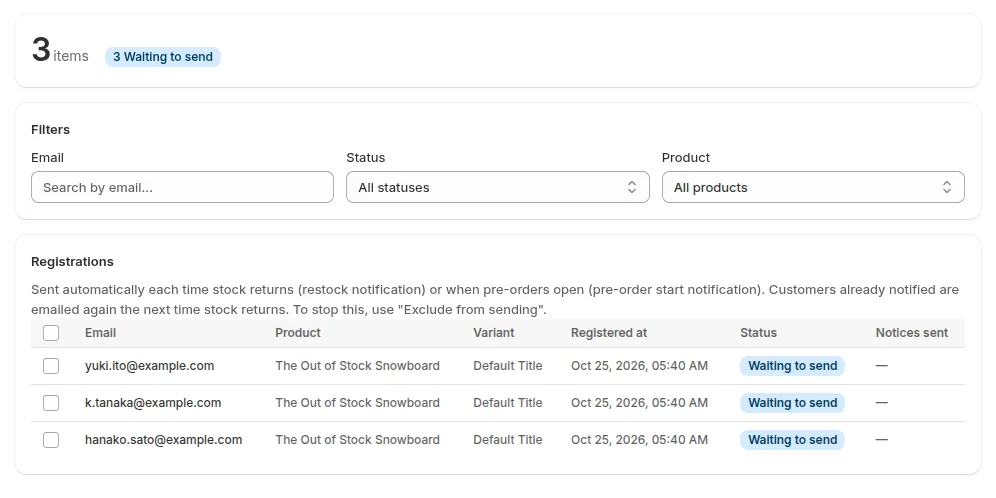
Then open “Back-in-stock subscribers” in the SellRules left menu. Your signup is complete if you see a row with your email address, product, variant and registration time, with the status “Waiting to send”.
4. Return the same variant's stock to 1 or more
Return the variant you signed up for to stock of 1 or more. If you signed up for the white mug, replenish the white mug. Replenishing only the black mug will not notify people waiting for white.
When stock returns, the normal buy button reappears and subscribers are sent “[Back in Stock] Product name”. Notifications first enter a sending queue, so delivery may take a few minutes. When the row in “Back-in-stock subscribers” changes to “Sent” and “Notices sent” shows “Sent 1 time”, the notification has been passed for sending. Those labels are applied when it enters the queue; they do not confirm receipt. The test is complete once you find the email in your inbox. On Standard or above, “Delivery log” also shows the result for each email.
5. Check that the email opens the right product page
Click “Buy Now →” in the email and check that it opens the product page for the variant you signed up for. At the bottom, there is an “Unsubscribe” link to stop future notifications.
Once this works, roll it out to your live products. Select and delete your test signup in “Back-in-stock subscribers” so it does not cause confusion when you review the list later.
Adjust the signup form and email wording for your shop
You can change the signup form text on any plan. Editing the email subject and body requires Standard or above.
For signup form text, open “Settings” in SellRules, find “Button and label text”, and select “Edit and translate text”. These fields apply to back-in-stock signups.
| Field | Default wording in English | Example replacement |
|---|---|---|
| Get notified button | Get Notified | Email me when it's back |
| Email input placeholder | Enter your email | Usually fine as it is |
| Intro text above the form | We'll email you as soon as it's available. | We'll email you when it's back in stock. This does not reserve an item. |
| Sign-up complete message | You're signed up! We'll notify you when available. | You're on the list. We'll email you when it's back. |
Leave the intro field empty to use the default wording in the customer's language, where SellRules has a translation. If you sell internationally, review each language tab after changing the text. See how to write multilingual pre-order messages for details.
For notification email wording, open “Restock notification” under “Email templates” in “Settings”. The default body includes “* Quantities are limited. Order early to secure yours.” An unsubscribe link is added automatically when the email is sent, even if you change the subject or body. On Standard or above, use “Send test” in the editor to send to your own address; the subject will start with “[Test]”. This test uses sample product names and other sample data. To check how a real product looks, receive a real notification using the steps above.
On Free, you can view the email template list but cannot edit templates. The default email already includes a subject, product name, purchase button and unsubscribe link, so you can start with it as it stands.
Who gets an email when stock returns, and how many?
Each person who signed up for the replenished variant receives one email, as does each person who signed up without selecting a variant, for example during a pre-launch announcement. Registrations marked “Excluded” are not sent emails.
| Situation | What happens |
|---|---|
| The white mug comes back into stock | People signed up for white and those with no variant selected receive the email. People signed up for black do not |
| The same person has a white-mug signup and a signup with no variant selected | They receive one email for that restock. The other row also changes to “Sent”, but its “Notices sent” count does not increase for this restock |
| A product sells out and is restocked again after a previous notification | Subscribers receive another email on the next restock. Use “Exclude from sending” for anyone who should stop receiving them |
| A customer clicks “Unsubscribe” in the email | The registration becomes “Unsubscribed by customer” and receives no further emails. The link works for 365 days after sending. Signing up again on the product page returns the registration to “Waiting to send” |
| The shop uses “Exclude from sending” | The registration becomes “Removed manually” and receives no further emails. However, signing up again on the product page returns it to “Waiting to send” |
| The Free plan's lifetime restock and launch email allowance has been used up | Emails are held instead of sent. After switching to Standard or Pro, stock, sales status and unsubscribe status are checked again before sending. If there is no stock at that point, the held email is cancelled and the registration waits for the next restock |
Stock is not counted again immediately before sending. If it sells out in the few minutes between the restock and email delivery, customers may receive an email for an item they can no longer buy. For products restocked in small quantities, say that quantities are limited in the product description or email.
Switching to pre-orders or deleting the rule stops automatic emails
If you change the sold-out switch from “Back-in-stock notification only” to “Pre-order” and save, or delete the rule, existing subscribers stop receiving automatic emails. You will need to contact them from your shop.
For example, you may collect back-in-stock signups while the arrival date is unknown, then switch to pre-orders once your supplier gives you a date. If you change the mode to “Pre-order” and save while stock is 0, the signup form becomes the “Pre-order Now” button. This change does not send a pre-order opening email to subscribers. Once switched to pre-orders, even replenishing stock no longer triggers their restock email. Their registrations remain “Waiting to send”.
Deleting the rule has the same effect. The automatic signup arrangement created by the rule is removed, but subscribers remain in “Back-in-stock subscribers” and receive no email when stock returns.
In either case, notify them from your shop as follows.
- Filter by product in “Back-in-stock subscribers” and download the list with “Export CSV”.
- Remove rows whose CSV status is “Excluded”. These include customers who unsubscribed and people you removed manually.
- Contact the remaining addresses through your shop's email or another suitable channel about pre-orders opening or stock returning.
For help deciding when to move from notifications to pre-orders, see pre-orders or back-in-stock notifications for sold-out products.
What to check if the signup form or email is missing
If the form does not appear, first check the app embed, inventory tracking and manually created sales schedules. If an email does not arrive, the person's status in “Back-in-stock subscribers” helps locate where the process has stopped.
| What you see | Possible cause | Where to check | What to do |
|---|---|---|---|
| Stock is 0, but the page still says Sold Out with no form | The app embed is off, or the new rule has not switched yet | App embeds in the theme editor. Reopen the product page after a few minutes | Turn the embed on and save |
| The switch never takes effect | The product is treated as having no tracked stock: inventory tracking is off, it is a gift card, does not require shipping, or similar | The creation-screen warning “This product doesn’t track inventory, so the sold-out switch won’t take effect.” and the inventory section in Shopify's product editor | For a physical product you sell, track its inventory and mark it as requiring shipping |
| The creation screen says “This product has a pre-order or made-to-order setting, so the sold-out switch won’t take effect.” | The product has a manually created sales schedule | Sales schedules in SellRules | Remove that schedule or use it to accept orders |
| Stock has returned, but the registration is still “Waiting to send” | You replenished another variant, changed to pre-orders, deleted the rule, or SellRules has not yet received the stock change | Compare the replenished and registered variants. Check the rule's switch mode. Reopen after a few minutes | Replenish the same variant. If you switched to pre-orders or deleted the rule, use the CSV to notify subscribers |
| The row says “Sent”, but the inbox is empty | The email is queued, held by the Free allowance, Restock notification is disabled in email templates, sending failed, or it went to spam | The banner at the top of the admin; Delivery log on Standard or above; then the spam folder | Follow the checks for missing back-in-stock emails |
| The admin banner says “Restock and launch emails have reached the allowance limit.” | The Free lifetime allowance is exhausted and emails are being held | The banner at the top of the admin | Switching to Standard or Pro lets the emails be sent after their conditions are checked again |
If you cannot tell whether the problem comes from store or product settings, contact support with the store URL, product and variant names, the time you replenished stock and the registration status. You do not need to send a screenshot showing customers' email addresses.
What this guide does not cover
This guide covers adding back-in-stock signup to a sold-out product and receiving the first email. For the following tasks, use the linked guides.
- Collecting signups before a product launches: use the announcement period of a sales schedule, rather than a sold-out switch. See collecting notification signups before launch.
- Missing emails that appear to have been sent, or resending: troubleshooting back-in-stock emails explains what to do for each delivery-log status.
- Deciding between pre-orders and back-in-stock signups: use the decision table in pre-orders or back-in-stock notifications for sold-out products.
- Customers' spam settings or mail-provider blocks: neither your shop settings nor SellRules can change these. Ask the customer to check their receiving settings.
Frequently Asked Questions
Does signing up for a back-in-stock email reserve an item?
No. Signup only requests an email when stock returns; it does not create an order or take payment. Everyone who signed up is notified when stock returns, and items sell on a first-come, first-served basis. Stock is not checked again immediately before sending, so an item may already be sold out by the time the email arrives.
How often does the same customer receive a back-in-stock email?
They receive one email each time stock returns. The same person will not receive two emails for the same variant's restock. Whole-product and variant signups are combined into one email. Someone who has already been notified receives another email if the product sells out and is restocked again. To stop this, the customer can use the email's unsubscribe link, or you can use “Exclude from sending” in “Back-in-stock subscribers”.
Can I use back-in-stock notifications on the Free plan?
Yes. The sold-out switch, product-page signup form, “Back-in-stock subscribers” screen and form text editing are available from Free. Free's allowance for restock and launch emails is cumulative from installation; emails over that limit are held rather than sent. Editing email subjects and bodies and viewing the delivery log require Standard or above.
Can I notify back-in-stock subscribers when pre-orders open?
Changing the sold-out switch from “Back-in-stock notification only” to “Pre-order” does not automatically notify subscribers that pre-orders have opened. They will not receive a restock email when stock later returns either. After switching, export subscribers as CSV from “Back-in-stock subscribers”, remove rows marked “Excluded”, and announce the pre-order opening through your shop's email.
Pricing and getting started: use one test product first
You can start back-in-stock notifications on Free. Prepare one test product, sign up with your own address using the steps above, and check that the email arrives.
SellRules plans and pricing
| Monthly price | LaunchEvery feature included |
|---|---|
| Monthly price | US$7.99 per month |
| Free trial | 10 days |
| Pre-order and made-to-order orders | Unlimited |
| Back-in-stock and sale-start emails (Notify Me) | Unlimited |
| Purchase limits | No limit on products |
| Customizable notification emails | Yes |
| Deposit payments | Yes |
Pre-orders, made-to-order, back-in-stock alerts, purchase limits, stockout switching, deposit payments and order processing are all included in the Launch plan.
The first 10 days are free. If you remove the app during the trial, you are not charged.
Back-in-stock and sale-start emails have no sending cap. The same goes for required messages such as order confirmations, shipping updates and balance reminders.
The Free, Standard, and Pro plans are closed to new sign-ups. Shops already on them keep their current terms.
Free includes up to 15 restock and launch emails in total from installation. The allowance does not reset monthly. As you start notifying customers about more products, switch to Standard at US$9.90 per month, which includes up to 1,000 emails per month. Standard also lets you edit email subjects and bodies in your shop's own words and check individual sending results in the delivery log. Standard and Pro have no free trial; Free is the way to try the app.
See SellRules back-in-stock notifications
Ready to test? Install the Free plan from the Shopify App Store.
Features checked on October 25, 2026 by JizaiDev, the developer of SellRules, using the code and display-text data of the app published on that date and the Back-in-stock subscribers screen. Product and quantity examples are illustrative, not taken from a real store. Check the Shopify App Store listing for current prices.