How to Prevent Returns Caused by Address Errors
Have you ever had a Click Post shipment returned because of an address problem?
Address issues are not caused only by customer typos. Errors can also happen when Shopify address data is transferred into the Click Post CSV format without proper conversion.
This article explains why address errors happen, how to split address data correctly, and how to reduce returns caused by formatting issues.
Why Address Errors Happen
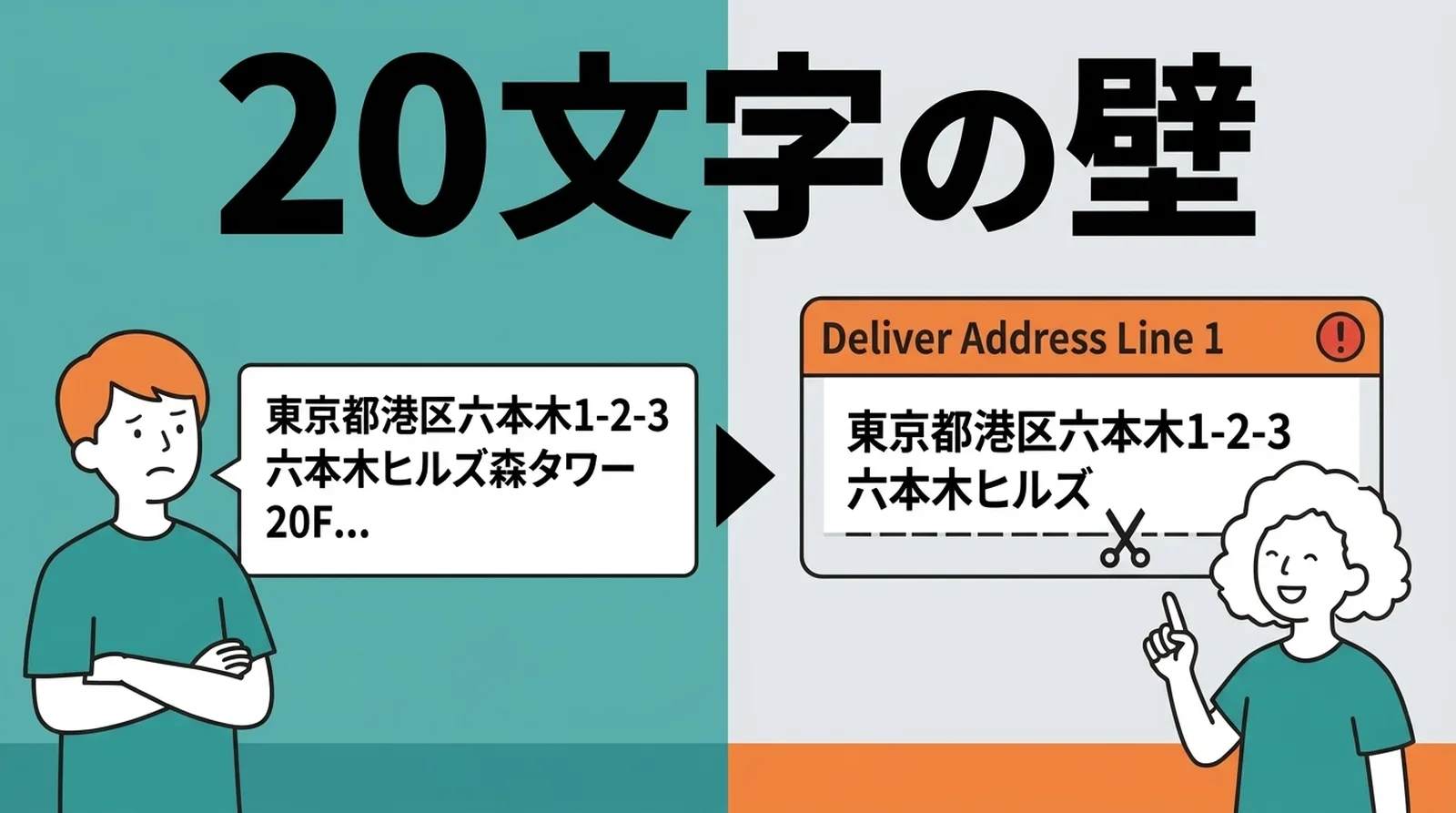
Click Post has strict character limits
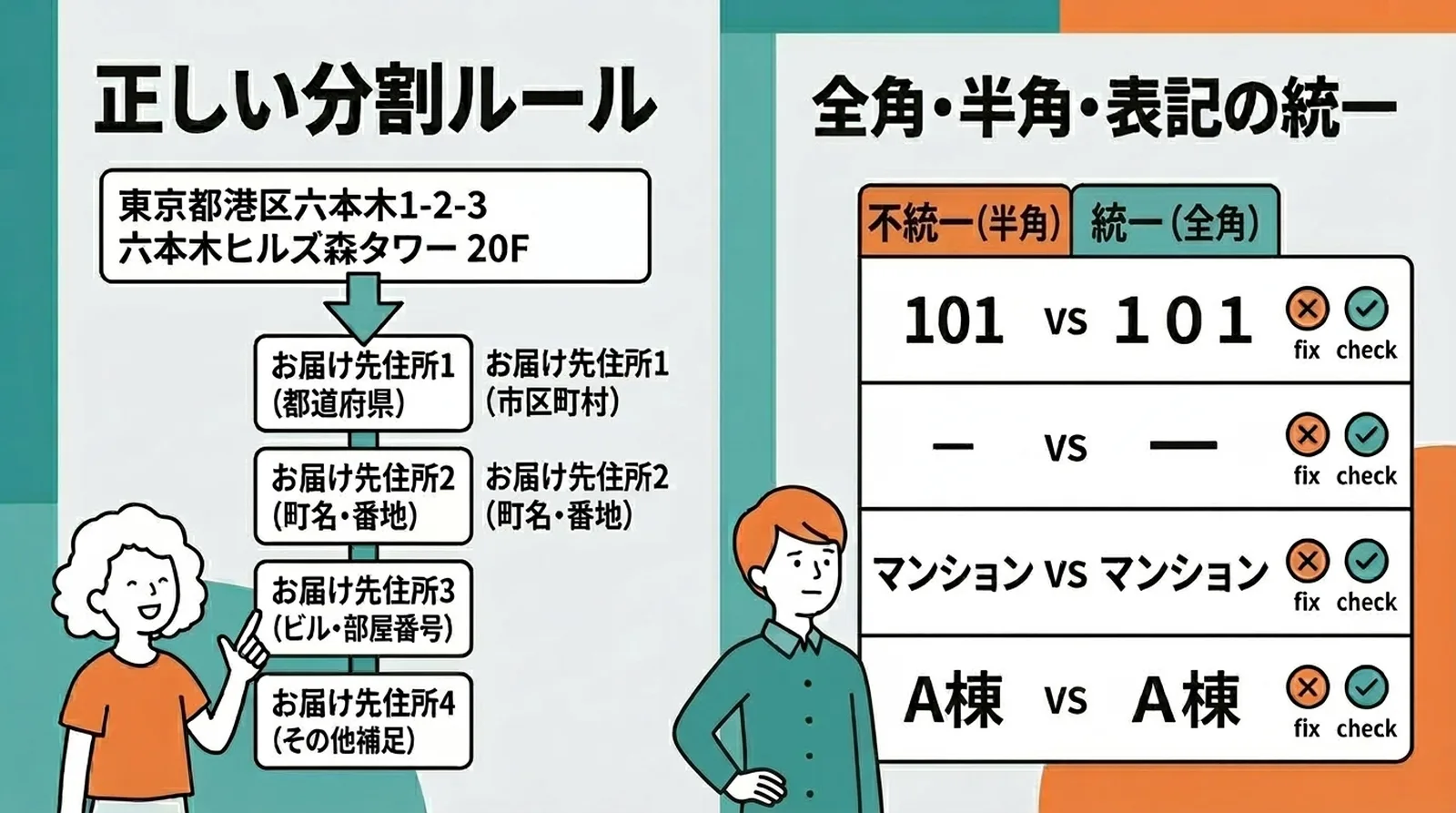
In Click Post CSV, the address is split across up to four fields, and each field has a maximum length of 20 full-width characters.
| Field | Typical content | Limit |
|---|---|---|
| Address line 1 | Prefecture and city or ward | Up to 20 full-width characters |
| Address line 2 | Town and block number | Up to 20 full-width characters |
| Address line 3 | Building and room number | Up to 20 full-width characters |
| Address line 4 | Extra notes if needed | Up to 20 full-width characters |
Shopify addresses do not match this structure directly
Shopify typically stores addresses mainly in Address1 and Address2. Those fields can be long and inconsistent depending on how the customer typed them.
If that data is pushed directly into Click Post CSV, one of two things happens:
- The import fails because the field length is invalid
- The address is truncated or misarranged, which can lead to a return later
This is one of the clearest examples of how a format mismatch between Shopify and Click Post creates operational problems.
Three Common Causes of Address Errors
1. Exceeding the character limit
This is the most common cause. Long building names, room numbers, or addresses with mixed scripts often do not fit neatly into one field.
The main solution is to split the address carefully into logical parts before export.
2. Mixing full-width and half-width characters
The length rule is based on full-width counting, so the exact format of numbers, hyphens, and letters matters.
Examples that often create issues:
| Type | Half-width example | Full-width example | Why it matters |
|---|---|---|---|
| Number | 101 | 101 | Character count differs |
| Hyphen | - | ー | Formatting becomes inconsistent |
| Katakana | マンション | マンション | Half-width kana can break import behavior |
Normalizing the output before creating the CSV is one of the safest ways to reduce errors.
3. Format inconsistency
Customers may enter the same kind of address in many different ways:
3-2-13丁目2番1号- With or without the prefecture
- With half-width or full-width building notation
The postal service may still understand many of these patterns, but the CSV formatting stage is less forgiving.
A Practical Address-Splitting Rule
When exporting Shopify data to Click Post, the following structure is a good default:
- Line 1: Prefecture plus city or ward
- Line 2: Town plus block number
- Line 3: Building name plus room number
- Line 4: Only if extra information is truly needed
Before finalizing the CSV, check:
- Each line stays within 20 full-width characters
- Half-width kana has been converted
- Digits and hyphens are normalized consistently
- The prefecture is not missing
The more of this you do automatically during CSV export, the lower your return risk becomes.
What to Do If a Shipment Is Returned
If a package is returned because of an address issue:
- Check the return reason noted on the package
- Confirm the original address in Shopify
- Ask the customer to confirm the correct address if needed
- Create a new shipping label and resend
- Record the cause so the workflow can be improved
Even when the postage itself is not huge, repeat returns quickly become costly once labor time is added.
Common Questions
Q. What if even four Click Post address lines are not enough?
That situation is rare, but if it happens you may need to abbreviate non-essential wording carefully while keeping the address deliverable.
Q. What if the customer entered the address incorrectly from the start?
That kind of issue may not show up as a CSV error, but it can still cause a return in delivery. If the address looks incomplete or suspicious, confirming before shipment is often worth the extra message.
Q. Why is half-width kana a problem?
Because Click Post CSV handling expects Japanese address data in a more normalized, full-width form. Half-width kana often increase the chance of broken formatting or import trouble.

Conclusion
Click Post address fields are strict: up to four fields, each within 20 full-width characters. Shopify address data does not automatically fit that structure, so direct export can easily cause length and formatting problems.
The core prevention steps are simple:
- Split the address correctly
- Normalize full-width and half-width characters consistently
- Convert half-width kana before export
If you want to reduce address-related returns without manually fixing CSV files, try Instant Shipping! for Click Post, which automatically splits Shopify address data into Click Post-ready format.