
Preparing for the Click Post Price Increase | Calculate the Cost Impact from Shipment Volume and Review Your Shipping Policy
Japan Post has announced that Click Post shipping rates will increase from 185 yen to 240 yen (tax included) on October 1, 2026. The following details reflect the planned changes announced as of September 19, 2026. This represents a 55 yen increase per package—a rate hike of approximately 29.7%.
When preparing for a rate revision, your first step should always be calculating how much the extra burden will cost your specific store. In this article, I walk through how to calculate your cost increase based on shipment volume, break down total fulfillment costs alongside postage, and evaluate whether to absorb the difference or adjust customer-facing shipping fees. For a complete overview of the revision—including updated dimension limits and drop-off rules—see October 2026 Click Post Changes.
First, Calculate Your Cost Increase Based on Shipment Volume
Here are the key points of the announced changes:
| Item | Conditions through September 30 | Announced Details Effective October 1 |
|---|---|---|
| Shipping rate (tax included, nationwide flat rate) | 185 yen | 240 yen |
| Size limits | Length 34 cm, width 25 cm, thickness 3 cm | Total 3 dimensions within 60 cm, longest side within 34 cm, and must fit into a post box |
| Weight limit | 1 kg | 2 kg |
| Drop-off method | Post box or post office counter | Post box drop-off in principle (post office counter drop-off available only under exceptional conditions) |
Count "Parcels," Not "Orders"
When calculating your cost increase, the baseline figure must be the actual number of parcels you ship, not your Shopify order count. If your fulfillment workflow splits a single order into two separate packages, your parcel count will be higher than your order count. Calculate your monthly average using label print records or fulfilled parcel counts from the past few months.
Formula and Benchmarks by Volume
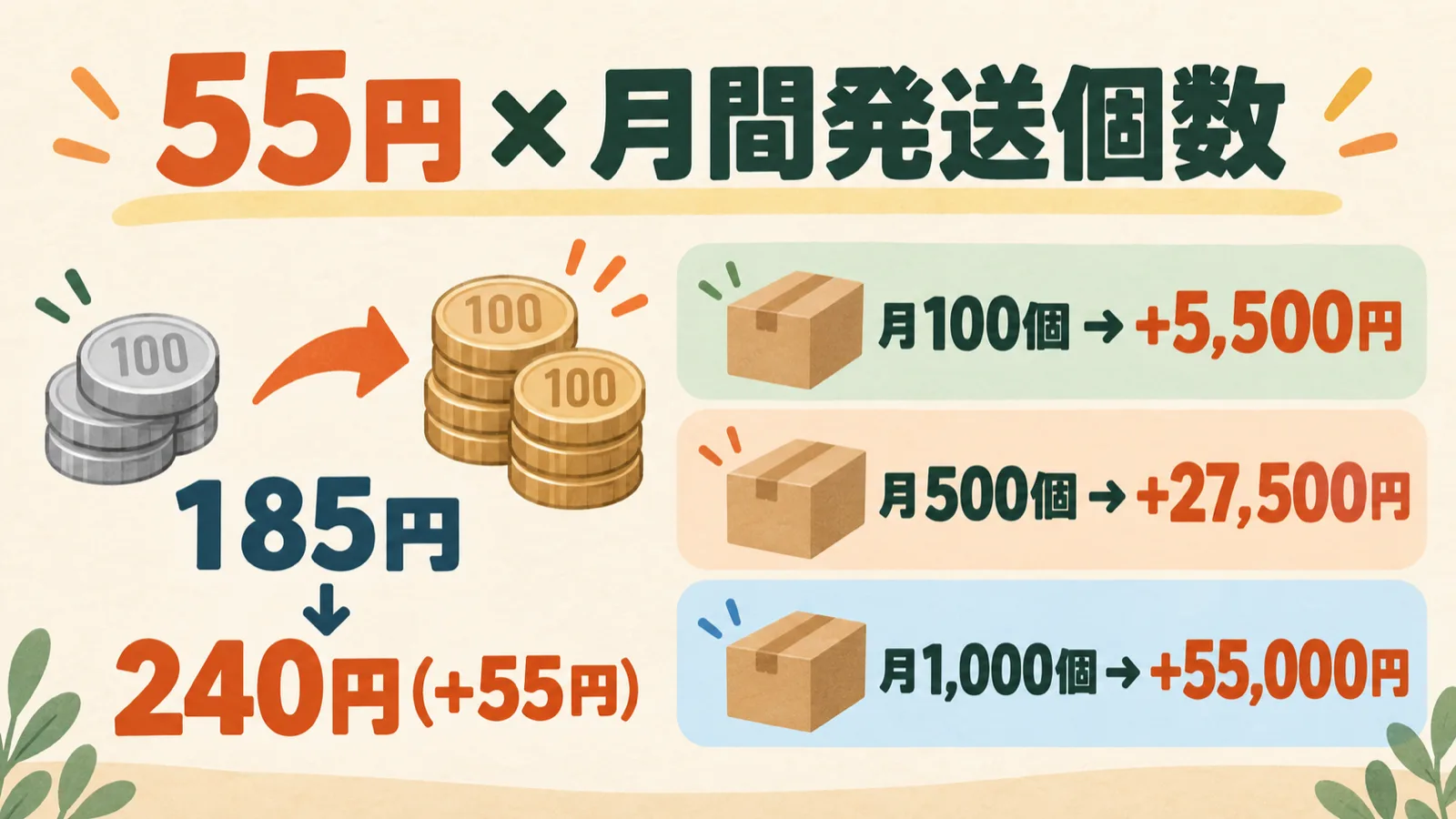
You can calculate the cost increase from the revision using 55 yen × monthly shipment volume (240 yen − 185 yen = 55 yen). This provides a straightforward comparison of tax-inclusive postage alone, assuming your shipment volume remains constant while each package shifts from the old rate to the new rate.
| Monthly Shipment Volume (Estimated) | Total at Old Rate | Total at New Rate | Cost Increase |
|---|---|---|---|
| 100 packages | 18,500 yen | 24,000 yen | +5,500 yen |
| 500 packages | 92,500 yen | 120,000 yen | +27,500 yen |
| 1,000 packages | 185,000 yen | 240,000 yen | +55,000 yen |
As an example for your store, if you ship 150 packages per month, the calculation is 150 packages × 55 yen = 8,250 yen per month. Annually, that equals 8,250 yen × 12 months = an increase of 99,000 yen. Note that this table and calculation compare postage only; they do not forecast store profits, which depend on packaging costs, labor, customer shipping fees, and sales fluctuations.
Cutoff for the Old Rate and Simultaneous Revisions to Other Services
According to the announcement, the old rate applies to transactions where payment processing is completed by 11:30 PM on September 30 (scheduled). The cutoff is strictly based on the completion of payment processing, not when the order was received in Shopify or when the package was dropped into a post box. In addition, Click Post will suspend services for scheduled system maintenance from 11:30 PM on September 30 to 6:00 AM on October 1, with notice that the restart time may shift slightly.
On the same date, October 1, Yu-Packet base rates are scheduled to be unified at a flat 360 yen (currently tiered by thickness at 250 yen, 310 yen, and 360 yen), and Yu-Pack parcel rates will increase by an average of approximately 10% (for example, size 60 intra-prefecture delivery at 840 yen according to the attached new rate table). Yu-Pack packaging supplies will also see price hikes (such as the size 60 box increasing from 100 yen to 110 yen). Merchants utilizing multiple shipping methods must recalculate fulfillment costs across all services they use, not just Click Post. Note that the figures listed here cover only base postage; consult the updated official documentation for island surcharges, specialized rates, and conditions.
Itemize Total Shipping Costs Beyond Postage
The 55 yen postage increase is an announced, unavoidable expense. However, true fulfillment costs extend far beyond postage alone. Breaking these costs down helps you identify areas where you can optimize operations.
| Cost Category | Description | Relationship to This Revision |
|---|---|---|
| Postage | Shipping fees paid to Japan Post | Announced rate increase from 185 yen to 240 yen on October 1 |
| Packaging materials | Envelopes, boxes, cushioning, tape, label paper | Independent expenses. May require review under the new dimension limits |
| Travel | Trips to and from post boxes or post office counters | Procedures may change due to drop-off updates (post box drop-off in principle) |
| Labor time | CSV export, payment processing, label printing, tracking number entry | Measured in time rather than cash. Explicitly label any monetary conversion as an estimate |
| Software / system fees | Monthly charges for Shopify, shipping apps, etc. | A separate expense category. Do not combine directly with postage |

Do Not Confuse Labor Conversions with Cash Outlays
If you convert labor time into monetary value, keep it in a separate column and clearly label it as an estimate. For example, assuming it takes 45 minutes to ship 10 packages, converting that at an hourly wage of 1,500 yen equates to approximately 113 yen per package. However, this is not an actual cash outlay; it is simply a benchmark for measuring potential workflow efficiency. Combining actual cash expenditures (postage, packaging, app subscriptions) with labor estimates into a single "cost per shipment" figure can distort business decisions, so keep them separate.
Similarly, track the costs of shipping errors, returns, and reshipments separately. If a package is returned due to an incorrect delivery address, you incur both reshipment postage and extra support time. While infrequent, the loss per incident is substantial, so recording monthly incident counts will provide valuable insights when reviewing operations.
Decide Whether to Absorb the Cost or Adjust Customer Shipping Fees
Once you have calculated your cost increase, decide how your store will handle it. There are three primary approaches, and no single strategy fits every store. Evaluate your decision based on your profit margins, competitor pricing, and repeat customer rates.
| Policy | Approach | Key Considerations |
|---|---|---|
| Keep rates unchanged (Store absorbs cost) | Keep customer shipping fees and product prices identical, absorbing the 55 yen/package from profits | Can your business sustain a 55 yen drop in profit per order? At 100 packages/month, that is a 5,500 yen increase in costs |
| Revise customer shipping fees | Raise the shipping fee charged to customers at checkout | Impact of a higher total checkout price on cart abandonment and competitor price comparisons |
| Update product prices and free shipping thresholds | Roll costs into item prices or raise the minimum spend threshold for free shipping | Recalculate profit thresholds for stores offering free shipping; plan how to announce price updates to customers |
For example, choosing to keep rates unchanged at 100 packages per month adds 5,500 yen in monthly expenses based on simple comparison. Raising customer shipping fees by 55 yen—from 185 yen to 240 yen—offsets the postage increase, but it raises the total price displayed at checkout. Whether to roll shipping into product prices or charge it separately as shipping is an essential strategic choice.
If your store offers free shipping, your costs still rise by 55 yen per package even though the customer's total remains unchanged. Be sure to recalculate profitability around your free shipping thresholds (such as free shipping on orders over a set amount). For deeper analysis, see When Is Offering "Free Shipping" Actually Feasible? and Shipping Included vs. Shipping Added: Which Drives More Sales?.
Review New Packaging Rules and Eliminate Operational Waste
Starting in October, the dimensions will change to "total 3 dimensions within 60 cm, longest side within 34 cm, and must fit into a post box," with the weight limit expanding to 2 kg. It is vital to note that this is not an across-the-board expansion. The current maximum dimensions of 34 × 25 × 3 cm equal a total of 62 cm across all three sides, which exceeds the new 60 cm limit. This means you cannot assume boxes you currently use will remain compliant; you must measure the outer dimensions of your finished packages.
Furthermore, do not jump to the conclusion that expanding the weight limit from 1 kg to 2 kg means you can simply bundle items together to reduce shipment counts. While bundling can theoretically reduce package counts and partially offset cost increases, verifying actual packed dimensions, total weight, and post box drop-off capability requires separate checks. Note that post office counter drop-off is restricted strictly to qualifying exceptional conditions and packages with a thickness of 3 cm or less. For guidance on package measurements and thickness rules, see How to Handle Click Post Packages Exceeding the 3 cm Thickness Limit.
Use this transition as an opportunity to identify operational waste as well. Repeatedly formatting CSV files, manually typing tracking numbers one by one, and dealing with returns caused by address errors become exponentially more burdensome as order volume grows. While operational improvements may not completely offset the postage hike, your true net cost increase is "postage increase minus eliminated waste."
Finalize Price Adjustments and Notification Schedules
Once you have settled on a strategy, determine the new customer shipping rate, effective date, and how you will communicate the change to shoppers.
- Account for order timing. When you update shipping profiles in Shopify, the new rates apply only to orders created after the change; existing orders are not automatically adjusted retroactively. Always test checkout behavior directly in your storefront cart.
- Synchronize all storefront messaging. Compile a checklist of everywhere shipping rates appear—your shipping policy, product detail pages, banner announcements, and free shipping conditions—and update them simultaneously.
- Set operational deadlines. Given the scheduled payment processing cutoff at 11:30 PM on September 30 and the subsequent maintenance downtime, schedule your Shopify setting updates and customer announcements well ahead of time.
For step-by-step instructions on updating rates and conditional rules in Shopify admin, see the Shopify Shipping Settings Guide.
Frequently Asked Questions
Q. Should you pass the entire price increase on to customers as shipping fees?
There is no single right answer. Absorbing the cost means your store takes on the 55 yen increase per package, while passing on the full amount raises the customer's total purchase price. Evaluate your store's profit margins, competitor shipping rates, and repeat purchase rates to compare absorbing the cost, revising customer shipping rates, or adjusting product prices and free shipping thresholds.
Q. Will stores offering free shipping also be affected?
Yes. Even if the amount billed to the customer does not change, the postage paid by the store increases by 55 yen per package. This makes it necessary to recalculate free shipping conditions (such as free shipping over a certain order value) and how shipping costs are built into product prices.
Q. Can shipments made by September 30 be sent at the old rate?
According to the announcement, the old rate applies to transactions where payment processing is completed by 11:30 PM on September 30 (scheduled). The determining factor is the completion of payment processing, not the order date or the drop-off date. Additionally, the system is scheduled to be down for maintenance from 11:30 PM on September 30 to 6:00 AM on October 1, and service resumption times may vary slightly.
Q. Can installing a shipping app absorb the price increase?
What an app changes is fulfillment workflow, such as CSV generation and tracking number registration; it does not change the postal rates themselves. Even if labor time is reduced, it does not automatically offset the increased postage, so postage and app fees should be evaluated as separate expenses.
Q. Is it cheaper to switch to other shipping methods like Yu-Packet?
Under the same revision date, Yu-Packet base rates are scheduled to be unified at 360 yen. Comparing base rates alone, Click Post at 240 yen remains cheaper. However, since allowable dimensions, additional fees, and terms differ, always check the latest official announcements before making a decision.
Summary
Preparing for the Click Post price increase starts with calculating your cost impact using "55 yen × monthly shipment volume." Once that figure is clear, itemizing packaging, travel, labor, and system costs allows you to evaluate with real numbers whether to absorb the difference or adjust customer shipping fees, product pricing, or free shipping rules. Because the announced revision is tied to the September 30 payment processing cutoff, plan your calculations and Shopify settings updates well in advance.
As parcel volume grows, the burden of repetitive tasks like exporting CSVs and registering tracking numbers also increases. To streamline that part of your fulfillment workflow, consider "Instant Shipping! for Click Post", a Shopify app developed and provided by JizaiDev, the operator of this site. Please check the Shopify App Store listing page for listed pricing (Standard plan at $8 USD/month, 10-day free trial, billed in USD) and current terms. Note that app fees are an expense separate from postage.
Rates and terms verified as of September 19, 2026. The announced revisions are scheduled to take effect in the future; please confirm the latest details via the Japan Post Revision Announcement and official Click Post Website.
Further Reading
- Shopify × Click Post Shipping Guide: End-to-End from CSV Export to Tracking Sync — Pillar guide covering the complete fulfillment process
- Shopify Shipping Settings Guide — Step-by-step instructions for updating shipping rates in Shopify admin
- When Is Offering "Free Shipping" Actually Feasible? — Balancing free shipping thresholds and profit margins
- Optimizing Packaging Material Costs — How to choose envelopes, boxes, and cushioning