PURCHASE LIMIT PLANNER
Turn a purchase-limit policy into settings
Choose how many units a customer may buy, who may buy them and how often. The planner shows the matching fields to enter on the SellRules purchase restrictions screen.
Your input is processed on this page only. The planner does not connect to Shopify or save or apply a setting.
Choose the conditions you need
Fill in only the limits you need. You can also require login, require a customer tag or suspend sales without adding a quantity cap.
What to compare
When Shopify's built-in limit is enough, and when SellRules is needed
If you only need one store-wide cart cap for each variant, check Shopify's built-in add-to-cart limit first. Use SellRules when you need product-specific caps, cumulative customer limits, purchase-count limits or buyer eligibility.
| What to compare | Shopify built-in | SellRules |
|---|---|---|
| Where the cap is configured | One store-wide cap applied to each product variant | Configured per product or variant |
| Cumulative customer quantity and purchase count across orders | Not covered | Available for identified customers |
| Login, customer tag and sales suspension | Not covered | Available as purchase eligibility |
| How colours and sizes are counted | Each variant is limited separately | Choose a product-wide total or separate variant counts |
| Main exclusions from the built-in cap | Untracked inventory, continue selling when out of stock, B2B catalogs with quantity rules, logged-in B2B customers, POS and draft orders | Confirm the product, customer identity and exceptions with a test product before launch |
Shopify Help checked on October 16, 2026.
Limits of this planner and purchase restrictions
- Inputs are processed in the browser and the planner does not connect to Shopify.
- Cumulative quantity and purchase count apply only to customers Shopify can identify.
- A different account or an unidentified guest cannot be treated conclusively as the same person.
- After installing, use a test product to try both an order that should pass and an order that should stop.
- The settings plan does not guarantee an outcome or prevent every attempt to bypass a limit.
- This planner does not configure individual variant rules or exclusions. Use the purchase restrictions section of the user guide.
Where to enter the settings in SellRules
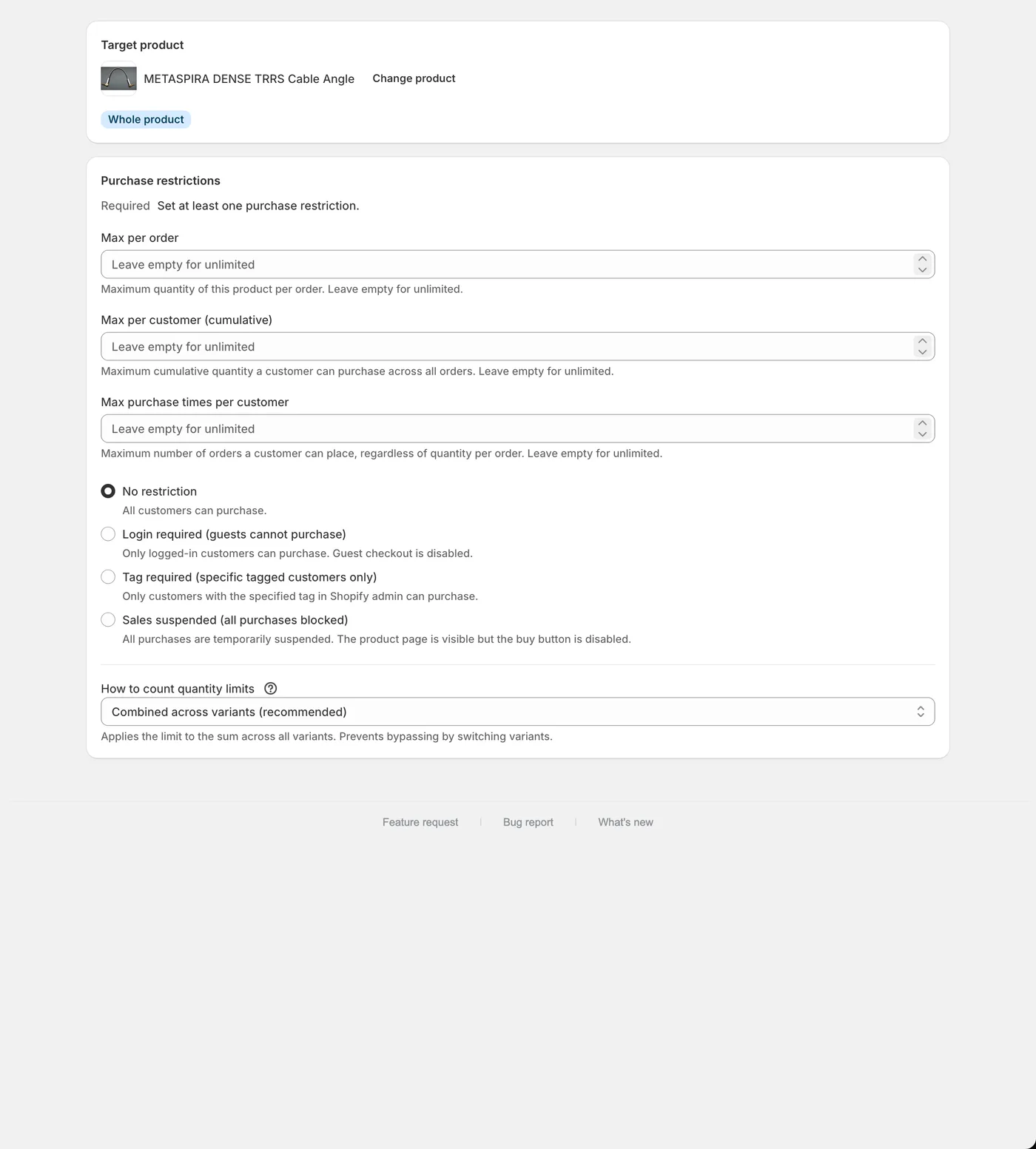
The actual purchase restriction creation screen, with three limits, purchase eligibility and quantity counting.
TRY IN YOUR STORE
Try the plan on a test product
Install SellRules and start with one test product. Try an order within the limit and an order that should be stopped before using the rule on a live product.
View SellRules in the Shopify App StoreYour settings and customer tag are not sent from this page.