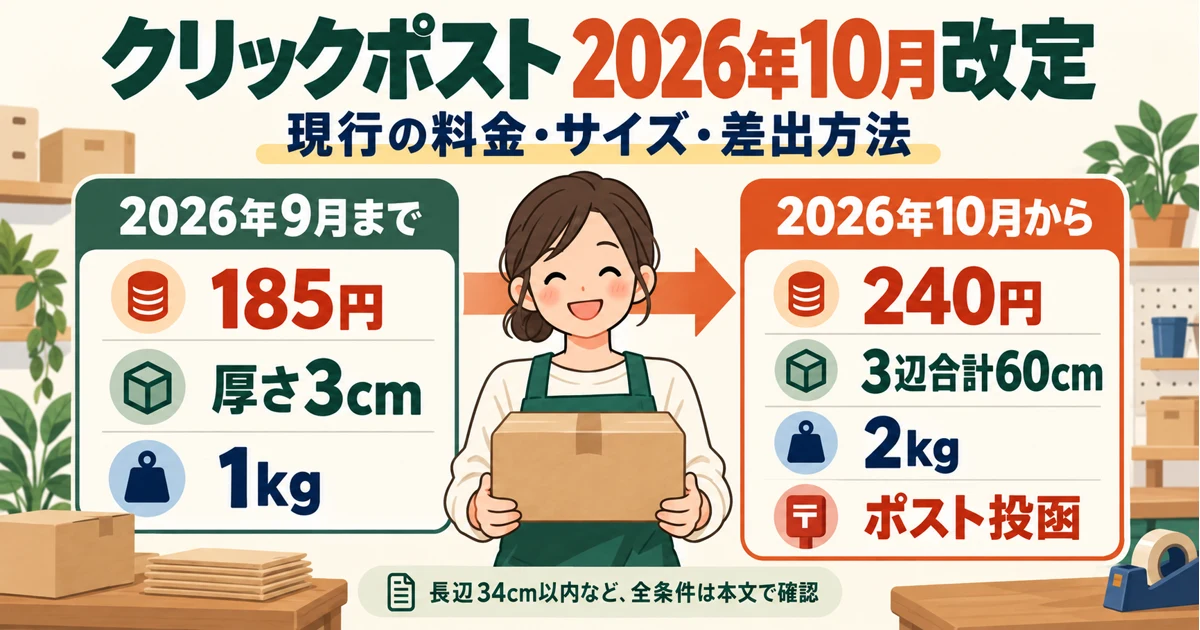
Shopify Shipping App Comparison: Which Should You Choose for Click Post Integration?
If you ship through Click Post from Shopify, how smoothly your daily fulfillment runs depends a great deal on the app you use, or on the fact that you use none.
With five orders, copy and paste gets you by. At 20 or 50 orders, the picture changes: the time spent formatting CSV files and copying tracking numbers grows with every order. That is time you could have spent packing or planning something new.
JizaiDev, the developer of "Instant Ship! for Click Post", lays out what to look for when choosing a shipping app for Shopify and Click Post. Because our own app is included, every comparison fact here is limited to what we could confirm on each app's listing page. For a comparison of all nine apps by type, see Shopify shipping app comparison. This article covers a same-conditions comparison limited to apps whose listings mention Click Post, plus how to test one order yourself.
Three features Click Post integration needs
Shipping from Shopify through Click Post asks three main things of an app. If any one is missing, manual work remains.
CSV export (conversion to the Click Post format)
Uploading a CSV to Click Post's bulk application ("matome moushikomi") requires a file in the specified format. Shopify's raw order export has different columns and different headers, so you would have to rearrange and convert it by hand.
Whether the app does this conversion for you makes a large difference in the time each shipment takes.
Registering tracking numbers
Creating a shipping label in Click Post issues a tracking number, and you then have to register that number on the Shopify order separately. To notify the customer about delivery status, you also need to mark the Shopify order as fulfilled and attach the tracking number to it.
Done by hand, that means copying the tracking number from the Click Post screen, opening the order in Shopify, and pasting it in, one order at a time.
Formatting address data
Click Post limits how many characters an address can hold and has rules for full-width and half-width characters. Shopify orders contain addresses exactly as customers typed them, so an address can exceed the limit or fail the format and cause an error.
Long building names and inconsistent street-number notation (a mix of "1-2-3" and "1-chome 2-ban 3-go") quietly eat time when you fix them manually.
What happens without an app (manual operation)
Shipping from Shopify through Click Post without an app generally goes like this:
- Export the orders from the Shopify admin as a CSV.
- Reformat the file by hand in Excel or a spreadsheet to match the Click Post format.
- Upload the CSV to Click Post's bulk application.
- Print the shipping labels, pack, and post the items.
- Enter each issued tracking number on the Shopify order, one at a time.
- Send the shipping notification email.
Steps 2 and 5 are the problem. Reformatting a CSV is a pile of small tasks: swapping columns, deleting unneeded ones, trimming addresses to the character limit, and unifying full-width and half-width characters. Typing tracking numbers in by hand takes time in direct proportion to the number of orders.
Overall, working time rises roughly in step with order volume. Repeating this every day in a busy season is a heavy load.
What to compare when choosing a shipping app
When you compare apps that support Click Post, these five points make the decision easier.
| What to compare | Why it matters |
|---|---|
| CSV export format support | Whether the app converts to the Click Post format automatically decides how much formatting work is left |
| How tracking numbers are registered | Manual copying versus extraction from the original PDF changes the time per order |
| Address formatting and warnings | Whether you can check in advance for truncation or garbled characters caused by the character limit |
| Monthly fee and pricing structure | It is a fixed monthly cost, so it has to be worth it for your shipment volume |
| Support beyond Click Post | If you may use Yamato or Sagawa later, managing them in one app is easier |
With these points in mind, let's look at several approaches.
Option: "Instant Ship! for Click Post"
As the developer, we introduce our own app here.
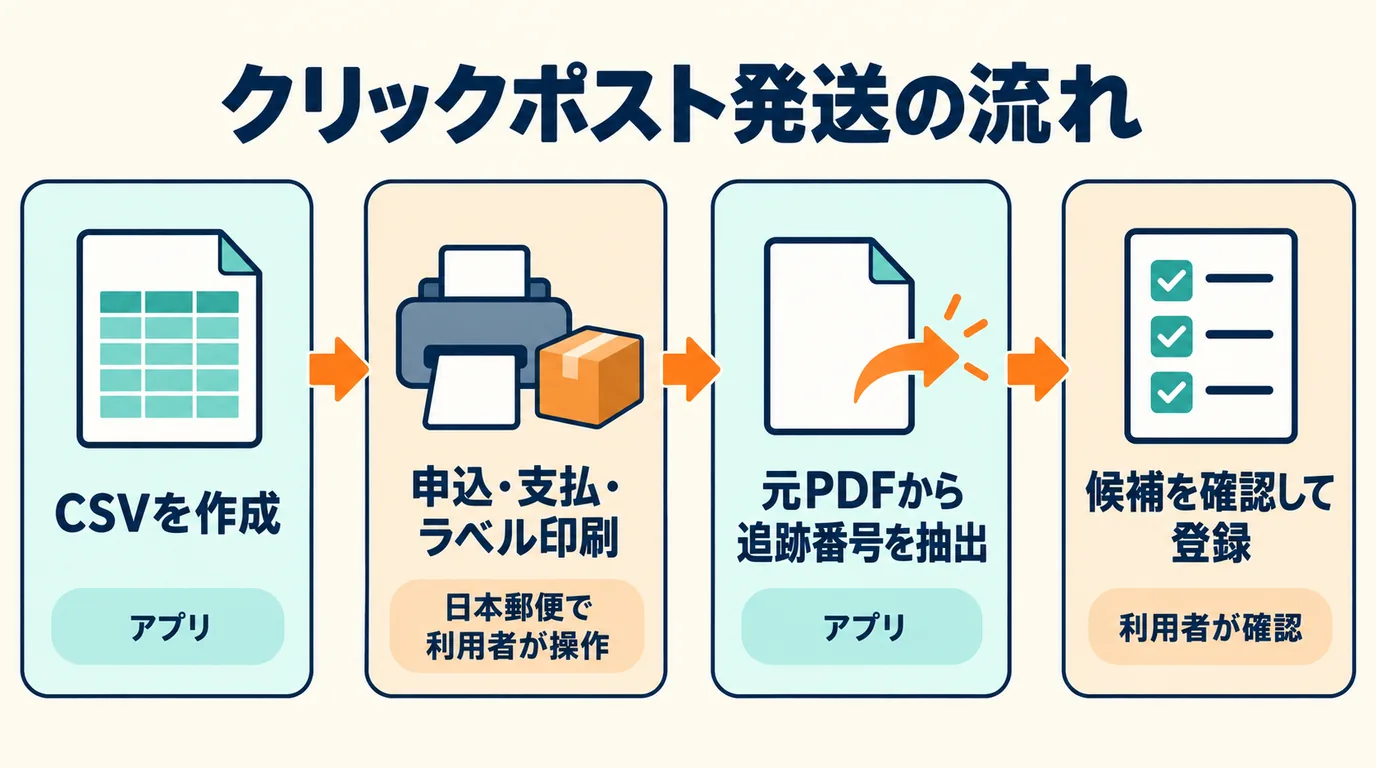
Instant Ship! for Click Post is a shipping-efficiency app designed specifically for Click Post.
What it does:
- Creates a Click Post CSV from unfulfilled Shopify orders (1–40 orders per export)
- Splits each address across four lines (up to 20 full-width-equivalent characters per line; text that does not fit at the end may be truncated. Characters Shift_JIS cannot represent may be replaced, and contents beyond the limit are cut, so you review the CSV)
- Extracts tracking numbers from the original Click Post PDF. If the PDF contains a Shopify order name, the app searches for an exact match and cross-checks the postal code when one is available. It searches by postal code only if no order name can be read. You review the candidate and tracking number, select the right order, and register it.
- Sends Shopify's shipping confirmation email when you register (it cannot be turned off)
Applying, paying, issuing and printing labels, and posting through Click Post are done by the user on the Japan Post side.
There are limits to know in advance. The only file it can read is the original PDF downloaded from Click Post; scanned PDFs and PDFs that have been edited or merged are not supported (1–2 files per upload, up to 10 MB each and 80 labels in total). The order list shows up to the 250 newest unfulfilled orders, so it may not include every unfulfilled order.
The app supports two of the tasks that cost the most effort in Click Post shipping: creating the CSV and registering tracking numbers. Specifications such as the four address lines and 20 full-width-equivalent characters per line are also summarized on the landing page.
The price is US$8 per month, with a 10-day free trial (checked on the listing page on 2026-10-14). You can start with a small number of orders and see whether it suits your workflow.
Comparison with other approaches
There are several other ways to make Click Post shipping more efficient. Each has different strengths, so consider them against your own store's situation. The information below is what we could confirm on each app's listing page (viewed in Japanese) on 2026-10-14.
Comparing apps that mention Click Post under the same conditions
Of the nine listings checked in Shopify shipping app comparison, three apps besides ours mention Click Post. The table lines them up on the same items, as confirmed on each listing page on 2026-10-14. The date checked for every row is 2026-10-14. Ratings and review counts are not compared here, so they are left out.
| App (listing page) | Click Post mention | Tracking numbers (as stated on the listing page) | Address check | Monthly fee | Free trial |
|---|---|---|---|---|---|
| Instant Ship! for Click Post | Yes | Extracted from the original PDF, candidates reviewed, then registered on the order. A notification email is sent on registration (cannot be turned off) | Splits addresses into 4 lines of up to 20 full-width-equivalent characters; the end may be truncated, so review the CSV after export | $8 | 10 days |
| Click Post CSV File Download | Yes | Not confirmed on the listing page | Highlights postal codes in the wrong format and addresses over the character limit | $5 | 7 days |
| Delivery Manager | Yes (the listing says it also supports Nekopos and Click Post) | Listed as "tracking number reflection" and "tracking number notification" | Not confirmed on the listing page | $9.90 (monthly plan) | 30 days |
| CSV Download | Yes (a Japan Post Holdings format on the paid plan) | Not confirmed on the listing page | Not confirmed on the listing page | $20 (paid plan) | 14 days |
Listing pages alone leave some doubt about how far each app can register Click Post tracking numbers. The surest way to find out is to test with a single order, in this order:
- During the free trial, prepare just one test order.
- Export the CSV, import it into Click Post, and check that the address fits.
- Check that the issued tracking number is registered correctly on the Shopify order and that the notification email goes out.
Ship&co
The app issues waybills for Yamato Transport, Sagawa Express, Japan Post, Seino Transportation, and others. The Shopify App Store listing, checked on 2026-10-14, did not mention Click Post. The official pricing page offers a 30-day free trial, followed by a monthly infrastructure fee of ¥1,100–¥11,000 and tiered charges of ¥22–¥10 per waybill based on monthly volume (tax included). Checked on 2026-10-14 on the official pricing page.
Plus Shipping
An app for issuing and printing Yamato Transport, Sagawa Express, and Japan Post waybills from the Shopify admin. The listing says there is no monthly fee and only special shipping charges apply. The listing page checked on 2026-10-14 did not mention Click Post. Click Post support is not confirmed on the listing page. If you need it, ask the developer.
Manual operation (no app)
If you ship only a few orders a month, running things by hand without an app is a realistic choice. It costs nothing to start, but be prepared for the time cost once volume grows.
Every app has strengths and weaknesses, and there is no single right answer. The best choice depends on whether your store centers on Click Post or uses several carriers. If you also use Yamato, Sagawa, and others, Shopify shipping app comparison, which lines up nine apps with the date each listing was checked, may also help.
Recommendations by store size
The best approach to fulfillment depends on shipment volume. The three size ranges below are editorial rules of thumb, not evidence-based thresholds. In practice, decide by your working time and packing effort.
Up to 10 orders a month: manual can work
While orders are few, manual operation can still keep up. Once CSV formatting feels routine, it is a good time to try an app that has a free trial. At this stage, the key is to judge whether the app's monthly cost is worth it.
10 to 100 orders a month: consider an app that supports CSV export and tracking number registration
In this range, manual tracking number entry and CSV formatting tend to become the bottleneck. An app that supports CSV export and tracking number registration may cut down the manual work. If Click Post is your main way of shipping, a dedicated app is an option that keeps things simple.
Over 100 orders a month: multi-carrier support or a 3PL
Past 100 orders a month, you may use Yamato or Sagawa alongside Click Post. You might then manage everything in one app that supports several carriers, or hand fulfillment itself to a 3PL (outsourcing). Judge by more than volume: also weigh working time, storage space, and the burden of handling returns.
For a comparison of in-house shipping and 3PL, see Self-shipping vs. 3PL.
FAQ
Q. Is there a free shipping app that supports Click Post?
"Instant Ship! for Click Post" has no free plan. It costs US$8 per month and comes with a 10-day free trial. During the trial, you can test with a small number of orders whether CSV export and extracting and registering tracking numbers from the original PDF suit your workflow. Free plans and free trials of other apps are summarized, with the date each listing was checked, in Shopify shipping app comparison.
Q. Can one app manage shipping methods other than Click Post?
It depends on the app. The Ship&co listing says it can issue waybills for Yamato Transport, Sagawa Express, Japan Post, and others, but we could not find a mention of Click Post. "Instant Ship! for Click Post" is an app dedicated to Click Post. Choose according to which shipping methods you use.
Q. Will installing an app reduce shipping mistakes?
It may reduce mistakes that come from manual work, such as exceeding the address character limit or mistyping a tracking number. You still have to review the CSV addresses and the suggested matches between tracking numbers and orders yourself. And an app cannot prevent physical mistakes such as packing the wrong item or leaving something out. Think of what the app streamlines as the "handoff of data".
Summary
To make Click Post shipping from Shopify more efficient, compare apps by how far they help with CSV export, tracking number registration, and address formatting.
- Manual operation works for a few orders a month but costs more time as volume grows
- A purpose-built app tends to fit stores centered on Click Post
- If you use several carriers, consider an all-in-one app or a 3PL
If Click Post shipping feels like a chore, try Instant Ship! for Click Post. You can start with a 10-day free trial at US$8 per month.
Related reading
- Streamlining Shopify × Click Post shipping — for readers who want the basics of connecting Shopify and Click Post
- How to export a Click Post CSV — for readers who want the concrete steps for exporting the CSV
- Self-shipping vs. 3PL — for readers whose volume is growing and who are considering outsourcing
- Checkpoints before installing a Shopify app — for readers who want to sort out the features they need before adding a shipping app
- Comparing nine Shopify shipping apps — for readers who also use Yamato, Sagawa, and others and want to compare apps with the date each listing was checked